Search for answers or browse articles about Sintel Forms
Basic Features
Sintel Forms provides a range of features to enhance and customise your SharePoint forms. Understanding how to enable or disable these features allows you to tailor forms to your specific needs, improving workflow automation, data control, and form behaviour. This guide outlines the core settings available in the Main Settings section.
Why Enable or Disable These Features?
Turning these features on or off lets you optimise form functionality based on your requirements. For example:
✔ Need automation? Enable workflows to streamline approval processes.
✔ Want smart forms? Enable logic to create dynamic rules and conditions.
✔ Tracking changes? Enable version history for better auditability.
✔ Keeping it simple? Disable features that aren’t needed to keep forms lightweight and user-friendly.
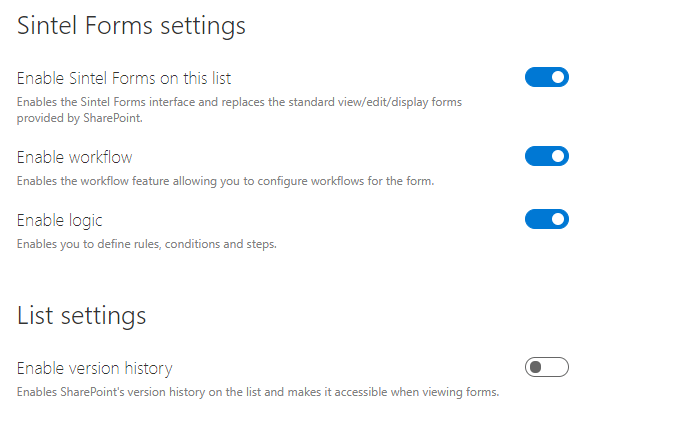
Enable Sintel Forms on this list
Activates the Sintel Forms interface, replacing the standard SharePoint forms for viewing, editing, and displaying items.
Enable Workflow
Allows you to configure workflows within the form, streamlining processes and automating actions.
➡ Learn more about workflows here.
Enable Logic
Enables the creation of rules, conditions, and steps to control form behaviour dynamically.
➡ Learn more about logic here.
Enable version history
Activates SharePoint’s version history, allowing users to view and restore previous versions of form entries.