
Try it
  • Examples
  • Features
  • Testimonials
  • Partners
  • Pricing
  • Support
    • Sintel Apps Help
    • Sintel Apps Release History
    • Sintel BI Help
    • Sintel BI Release History
    • Webinars
    • How to video series
    • Ask the community
    • Submit a ticket
    • Request a demo
    • Compare us
  • Blog
  • Examples
  • Features
  • Testimonials
  • Partners
  • Pricing
  • Support
    • Sintel Apps Help
    • Sintel Apps Release History
    • Sintel BI Help
    • Sintel BI Release History
    • Webinars
    • How to video series
    • Ask the community
    • Submit a ticket
    • Request a demo
    • Compare us
    • For Schools
  • Blog
  • Get Started
How can we help?

Search for answers or browse articles about Sintel Forms

Filter by categories Clear Results
  • About Sintel Forms

    • SharePoint List types supported by Sintel Forms
    • What is Sintel Forms
    • Why we built it
    • Sintel Apps and the security of your data
  • Getting Started

    • How to Install Sintel Forms
    • Adding Sintel Forms to a SharePoint Site
    • Authorizing Sintel Forms
    • Install Sintel Forms for SharePoint On-Prem
    • Sintel Forms Best Practices
  • Product Updates

    • Release History
    • Updating Sintel Forms for SharePoint On-Prem
    • Differences between the Cloud and On-Prem Versions of Sintel Forms
  • Settings

    • External Access Settings

      • Understanding External Access Settings in Sintel Forms
      • External Submissions
      • External Collaboration
      • External Sharing
      • External Access Settings
    • After save script
    • Basic Features
    • Conversations
    • Form Viewer
    • Hide Sintel Branding
    • Payments
    • Theme & Styling 
    • Confirmation screens
    • Localisation
    • How to avoid SharePoints list view threshold
  • Layout

    • About Layout
    • Adding and Editing Linked List items using Inline, Dialog & Sintel Forms Embedded
    • Adding Fields
    • Creating Calculated Fields & Using Formulas
    • Default values & custom values
    • Field and Section Validation
    • Linked Libraries-Using a Document/Picture Library
    • Linked Lists-How to add attachments
    • Sections - Tab order
    • Setting field properties within a Linked List
    • Using a Linked List
    • Form Header and Footer
    • New "Cosy" Form Interface
  • Workflow

    • About Workflow
    • Workflow: Statuses
    • Workflow: Actions
    • Workflow: Email
    • Workflow: Payment Actions
    • Deprecation of the SintelFormsWorkflow list
  • Logic

    • About Logic
    • Logic: Steps
    • Logic: Conditions
    • Logic: Rules
  • Reminders

    • Reminders
  • Basic Customisation

    • Applying a theme and adding icons or graphics
    • Changing button colours or hiding them
    • Embedded Action Buttons (deprecated)
    • Customising Send-From Address for Sintel Apps Emails
  • Advanced Customisation

    • The JavaScript API

      • Articles coming soon
    • Accessing external APIs
    • Creating custom buttons using JavaScript
    • Custom form styling using CSS
    • Programmatically creating Sintel Forms
    • The JavaScript API
    • Using query string parameters for default/calculated values
    • Restrict access to users not found in a SharePoint group
    • Advanced Customisation and Code Samples
    • Advanced Customisations: Quick Navigation Guide
  • FAQs

    • FAQs
    • Activating Sintel Forms on newly created tenants
    • Lists and columns used by Sintel Forms
    • Support and Training
    • Track the usage of Sintel Forms
    • Differences between the Cloud and On-Prem Versions of Sintel Forms
    • Permissions used by Sintel Forms
    • Permissions required to use the Sintel Forms Designer
    • SharePoint Add-Ins are retiring what can you do
  • How To Guides

    • Automatically add linked items or files
    • Change the layout of Choice Fields
    • Configure a cascading drop-down
    • Configure Printing Options
    • Debugging your forms
    • Embedded Action Buttons (deprecated)
    • Export a form template
    • How to complete a form action with Power Automate
    • Import a form template
    • Lookup Columns: Control the sort order
    • Lookup Columns: Retrieve additional columns from Lookup List
    • Make Attachments Mandatory
    • Set & clear field values using rules
    • Share a Form
    • Track the usage of Sintel Forms
    • Transferring your license to another tenant
    • Use Sintel Embedded Mode on a linked list
    • Use a Rule to check if third party cookies are enabled
    • Customising Send-From Address for Sintel Apps Emails
    • Recommended Permissions For Forms and Apps
    • Disable Sintel Forms on a list
    • Show all articles ( 6 ) Collapse Articles
  • Widgets

    • Buttons
    • Workflow History
    • HTML Widget
  • Noteworthy Features

    • Attachments and Image Previews
    • Image Annotations
    • Ink Signatures
    • Sintel Forms Mobile App
    • Workflow History
  • Troubleshooting

    • The redirect URL specified in the request does not match
    • Everything is fine but we had a small problem getting your license
    • "401 Unauthorized" error during form data save
    • "500 internal server error" on form opening
    • Activating Sintel Forms on newly created tenants
    • Ad blockers and Privacy Extensions
    • Attachments option missing in Sintel Forms
    • Changing the Content Approval settings of a list can cause an issue with Sintel Forms
    • Enabling third-party cookies
    • Handling the list view threshold for the Workflow and Conversations features
    • No actions appearing in the actions menu
    • Sintel Forms doesn't appear to be applied to a list
    • Sintel Forms Designer not available in the list command bar
    • Sintel Forms Save Process
    • Site naming and Sintel Forms
    • The remote server returned an error: (401) Unauthorized when importing a form template
    • Workflow emails containing incorrect links to forms
    • Workflow emails not being received by distribution lists or mail-enabled security groups
    • Workflow emails not being received by SharePoint group members
    • Data load error: Connection to SharePoint has been lost. Please reload the page.
    • Data save error: Access denied. You do not have permission to perform this action or access this resource
    • Email address of a Shared Mailbox not recognised by Sintel Forms
    • Add an exception for Sintel Forms instead of enabling third-party cookies
    • Export to PDF not working on SharePoint Subscription Edition
    • "404 FILE NOT FOUND" when attempting to open a new form or existing form
    • Show all articles ( 10 ) Collapse Articles
  • Code Samples

    • Embedded Action Buttons (deprecated)
    • Set email address from person field
    • Validate email addresses
    • Advanced Customisation and Code Samples
    • Advanced Customisations: Quick Navigation Guide
  • Sintel General Info

    • What we do
    • Who we are

Applying a theme and adding icons or graphics

Posted4 August 2020
Updated4 August 2020
ByPiotr Jasek
You are here:
  • Main
  • Basic Customisation
  • Applying a theme and adding icons or graphics
0 out of 5 stars
5 Stars 0%
4 Stars 0%
3 Stars 0%
2 Stars 0%
1 Stars 0%
< All Topics


You have 3 options for styling and adding graphical elements to your forms. You can choose one or a combination of all of them to achieve the design you need.

  • ThemeWithin the Setting screen of the Sintel Forms Designer you can define a custom theme to apply to your form that matches your organisations branding guidelines.
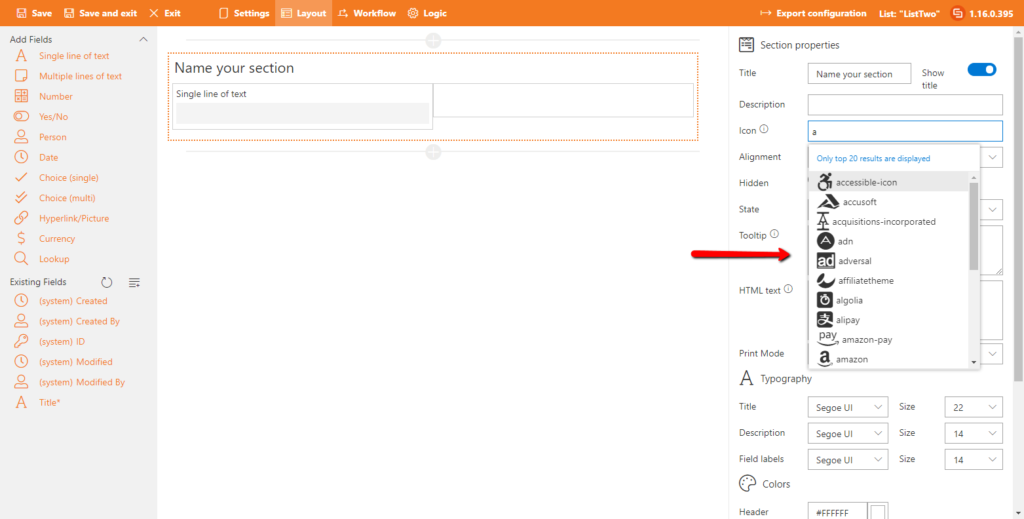
  • Custom IconsYou can use the built-in FontAwesome support to add an icon to any sections from the thousands of icons available.
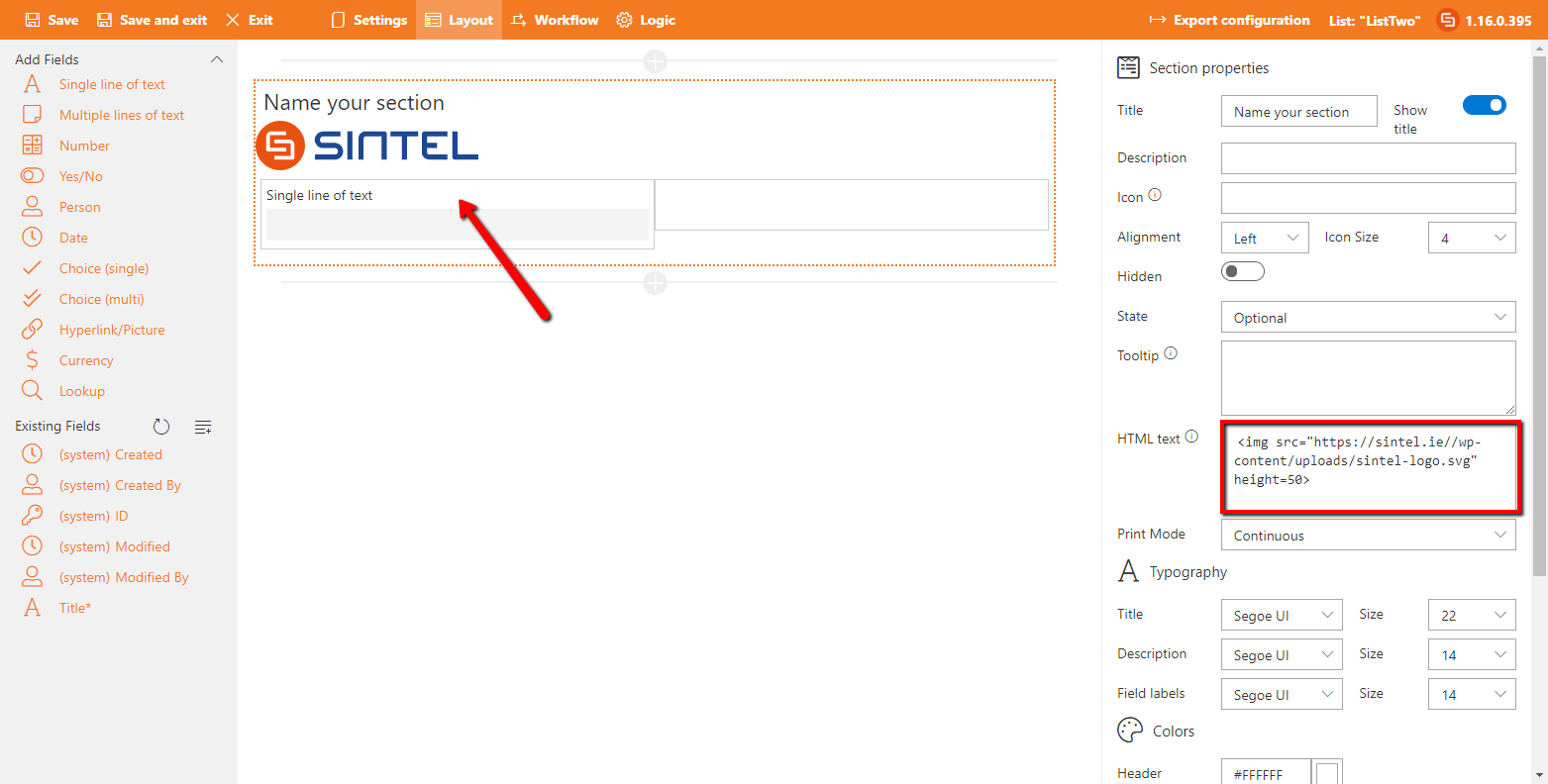
  • Custom GraphicsYou can use the “Custom HTML” property of a section to embed images or your company logo.


Applying a theme

The effective way to improve the visuals of your Form is by applying the theme. The global Theme settings can be found in the Settings screen. Once you have defined a Theme it’s settings are applied for every new section and field placed on the layout.


Notice that the option ‘Inherited’ is enabled. That means that every change made to the global Theme settings will be automatically applied for this section/field. You can always disable this if necessary or manually override it by simply making changes to the typography/colors directly on the layout screen.


Adding Icons

  1. Launch the Sintel Forms Designer and click on the section in which you want to add an icon.
  2. Within the “Icon” property type the name of an icon to start seeing suggestions or browse the FontAwesome website to find the one you wish to use.
  3. Once you have chosen the icon you can optionally set its alignment and size, you can also set its color from within the “Theme” group near the bottom of the properties panel.


Adding Graphics

  1. Launch the Sintel Forms Designer and click on the section in which you want to add the graphic.
  2. Within the “Custom HTML” property insert HTML such as the following example, replacing the path with the path to your graphic.
<img src="https://s3.eu-west-1.amazonaws.com/sintel.workspace/DemoFormLogos/sfs-logo.svg" height=50>

 

2019-12-19_1223.png

While you can use graphics that are stored on your SharePoint site/tenant it’s important to note that if you intend to use the “Export to PDF” feature of Sintel Forms that all graphics used need to be publicly accessible without requiring a login. If you use graphics that are not publicly accessible they will not appear on the exported pdf.
Was this article helpful?
0 out of 5 stars
5 Stars 0%
4 Stars 0%
3 Stars 0%
2 Stars 0%
1 Stars 0%
5
How can we improve this article?
Please submit the reason for your vote so that we can improve the article.
Table of Contents

Sintel Apps

Create apps on Microsoft 365 in minutes with no code.

Address

River House
Blackpool Park,
Cork, T23 R5TF,
Ireland

Support

  • Product help
  • Community site
  • Submit a ticket
  • Compare us

    Contact us to

    • Book a demo
    • Request a license
    • Become a partner

    e-mail: info@sintelapps.com
    tel: +353 (0) 21 245 2935

    Follow us

    • Follow
    • Follow
    • Follow

    © Copyright 2026 | End User License Agreement | Privacy Policy | Terms Of Use

    Sintel Apps
    Sintel Apps Assistant
    Get instant answers and support
    Connecting to Sintel Apps Assistant…
    Sintel is thinking…
    We use cookies to collect and analyse information about the users of this website. Please click 'I accept' to consent to the use of this technology.