
Earlier Session
10:00 AM EST
November 18
Register →This session has ended.
Webinar · 18 November
Discover how easy it is to build powerful business apps on Microsoft 365 with Sintel Apps and Sintel BI.
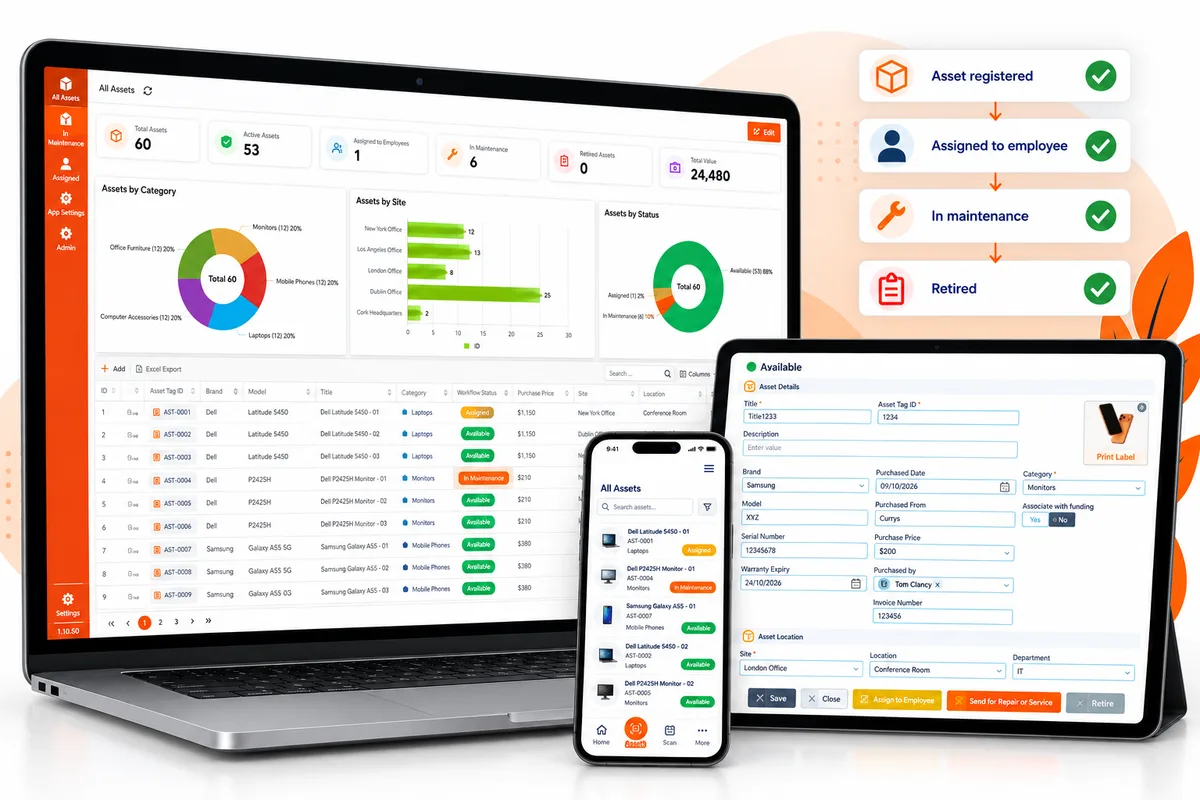
Join our practical webinar as we demonstrate how to build an Asset Management Application, covering everything from forms and business logic to workflows, approvals and data visualisation.
You’ll receive the complete Asset Management App template for free, ready to use in your business with a Sintel free tier.
Same webinar. Same content. Two convenient times: simply choose the session that works best for you.
10:00 AM EST
November 18
Register →This session has ended.

2:00 PM EST
November 18
Register →This session has ended.
Can’t make it live? Register anyway, and we’ll send you a recording after the webinar.
What is Sintel?
Sintel Apps and Sintel BI make it easy to turn everyday business processes into professional applications on Microsoft 365.
Capture business data with responsive forms for desktop, tablet and mobile.

Create approvals, notifications and multi-step business processes.

Control how your applications behave with rules and logic.

Turn captured data into dashboards, charts, grids and reports with Sintel BI.
What you’ll build in the webinar
We’ll demo and show you how to build a complete Asset Management Application, showing you how to:
You’ll see the complete journey from business requirement to a working Microsoft 365 application.
Take the finished app with you
Every attendee will receive the complete Asset Management Application template for free.
Import it into your environment, customise it to your requirements and branding, and start using it in your business.
✓ You can use the app for free with the Sintel free tier.
Get answers to the most common questions.
Microsoft Forms is primarily designed for surveys, questionnaires and simple data collection, while Microsoft Power Apps is a broader low-code platform for building applications across different data sources and Microsoft services.
Sintel Apps takes a different approach. It is designed specifically for organisations that want to build business applications on SharePoint Online and Microsoft 365, combining modern forms, business logic, workflows, approvals and dashboards.
If SharePoint is already at the centre of your business processes, Sintel Apps provides a SharePoint-focused way to turn lists and libraries into complete business applications.
Start free with the Lite plan (2 forms and 2 workflows, unlimited users), and get a 30-day trial of the Enterprise plan when you install from Microsoft Marketplace. No credit card required. See our Get Started page for the steps, or contact us if you would like help evaluating Sintel Apps for your organisation.
Sintel Apps is designed to work within your Microsoft 365 and SharePoint Online environment. Business data created and managed through your applications is stored in SharePoint lists and libraries within your Microsoft 365 tenant.
Sintel Apps works with Microsoft 365 authentication, SharePoint permissions and secure HTTPS communication, allowing organisations to retain control over their business data and access permissions.
Visit our Pricing page to review the available Sintel Apps subscription options. You can then request a licence or contact our team to discuss the most appropriate subscription for your organisation.
Sintel Apps licences are normally activated shortly after your order and payment have been confirmed. If you need assistance with licence activation, please contact our support team.
We provide several ways to get help with Sintel Apps:
Legacy Sintel Forms documentation remains available for organisations maintaining existing SharePoint On-Premises solutions.
Sintel Apps is our current SPFx-based platform for SharePoint Online and Microsoft 365.
For SharePoint On-Premises environments, Sintel Forms remains available as our legacy solution.
Organisations using Sintel Forms on SharePoint Online should migrate to Sintel Apps, which replaces Sintel Forms as our current platform for Microsoft 365.
Yes. The Lite licence is free: it includes 2 forms and 2 workflows for unlimited users, so you can start building applications on SharePoint Online straight away. Lite does not include support.
For larger solutions and additional capabilities, paid subscription options are available. Visit our Pricing page for the current features and licensing options.
Yes. Sintel Apps supports external access scenarios that allow users outside your organisation to interact with forms and business processes without requiring direct access to your SharePoint environment.
This makes it possible to build external-facing solutions for customers, suppliers, contractors and other users while keeping the underlying business data within your Microsoft 365 environment.
We accept major debit and credit cards, Stripe and bank transfers. If your organisation has specific purchasing, invoicing or procurement requirements, please contact our team and we will be happy to assist.
Yes. We can help organisations design, build and implement complete business applications on SharePoint Online using Sintel Apps.
This can include modern forms, business logic, workflows and approvals, integrations, dashboards and reporting. We can assist with both new applications and the modernisation of existing SharePoint business processes.
Yes. Sintel Apps can be used by Microsoft 365 consultants, SharePoint specialists and IT solution providers to build business applications for their customers.
Our Partner Program provides resources and support to help partners deliver solutions using Sintel Apps, with benefits including internal-use licences and commissions on new licence sales.
Sintel Forms is our legacy SharePoint solution and has been replaced by Sintel Apps for SharePoint Online and Microsoft 365.
Sintel Apps is our current SPFx-based platform for building modern forms, workflows and complete business applications on SharePoint Online.
Sintel Forms remains available as a legacy solution for organisations using SharePoint On-Premises