
Try it
  • Examples
  • Features
  • Testimonials
  • Partners
  • Pricing
  • Support
    • Sintel Apps Help
    • Sintel Apps Release History
    • Sintel BI Help
    • Sintel BI Release History
    • Webinars
    • How to video series
    • Ask the community
    • Submit a ticket
    • Request a demo
    • Compare us
  • Blog
  • Examples
  • Features
  • Testimonials
  • Partners
  • Pricing
  • Support
    • Sintel Apps Help
    • Sintel Apps Release History
    • Sintel BI Help
    • Sintel BI Release History
    • Webinars
    • How to video series
    • Ask the community
    • Submit a ticket
    • Request a demo
    • Compare us
    • For Schools
  • Blog
  • Get Started
How can we help?

Search for answers or browse articles about Sintel BI

Filter by categories Clear Results
  • Getting Started

    • What is Sintel BI
    • How to install Sintel BI
    • How to configure Sintel BI
    • How to use Sintel BI
    • How to install Sintel BI without AppSource
    • Sintel BI Best Practices
  • Data Sources

    • Data Sources
    • MS SQL
    • Excel
    • How to Merge Data Sources
  • Charts

    • Area Chart
    • Column Chart
    • Doughnut Chart
    • Line Chart
    • Pie Chart
    • Pyramid Chart
    • RAG area chart
    • RAG line chart
    • Spline Chart
    • Spline Area Chart
    • Stacked Column Chart
    • Stacked Line Chart
    • Step line chart
    • Polar Charts
    • Gauge Charts
  • Grids

    • Grid
    • Pivot Grid
    • Scheduler
  • Filters

    • Dashboard Level Filtering

      • User Filter
      • Multi-source dropdown filter
      • Dropdown Filter
      • Date Filter
      • Dashboard Override
    • Data Source Level Filtering

      • Data Source Filter
      • Dashboard Override
      • Dynamic Column
    • Filtering Guide: Understanding Your Options
  • General components

    • Image
    • Summary Card
    • Text
    • Maps
    • Kanban Board
    • Card
    • Custom HTML
    • Smart Card
    • Button
  • FAQs

    • Lists used by Sintel BI
    • Components Guide
    • Convert a Classic SharePoint site to a Modern Site
    • Permissions Required to Use Sintel BI
  • Troubleshooting

    • Cannot update the Sintel BI App
    • Cannot open Sintel Forms in a dialog
    • Blank screen when opening a dashboard
    • Warning when opening a dashboard
    • Error when attempting to view data in a data source
    • Error displaying data on a Dashboard
    • Cannot export an app due to outdated data sources
    • Cannot export an app due to error
    • How to remove or reinstall Sintel BI
    • Cannot Export a Sintel App Template due to long internal field names
    • Cannot share dashboards with AD groups
    • Warning SintelBISPSPrinciples does not exist
    • Sintel BI The Server Isnt Responding Temporary Fix And AppSource
  • Product Updates

    • Release History
    • How to update Sintel BI
  • Create App Templates

    • How to Import/Export a Sintel BI App
    • Sintel App Template Permissions
  • Settings

    • Navigation
    • The Sintel BI App Hub
  • Other

    • Web Parts
  • Advanced Features

    • Creating a Custom Landing Page in Sintel BI with CSS

What is Sintel BI

Posted29 March 2021
Updated11 December 2023
ByAmy Dermody
You are here:
  • Main
  • Getting Started
  • What is Sintel BI
0 out of 5 stars
5 Stars 0%
4 Stars 0%
3 Stars 0%
2 Stars 0%
1 Stars 0%
< All Topics

Sintel BI is an add-in for Microsoft 365 that permits you to build dashboards and reports on Microsoft 365.

Business users can build interactive dashboards with components such as data grids, images, text, summary cards, and filters.

Its flexibility and ease of use enables users to build apps without burdening the IT department.

When combined with Sintel Forms users can build apps on Microsoft 365 in minutes using a platform that’s easy to use and requires no code!
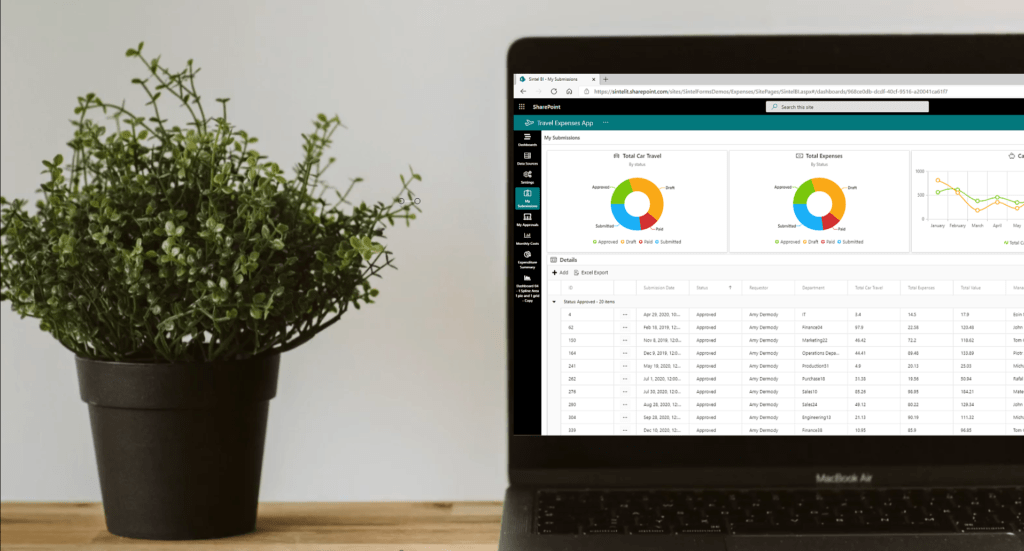
Sintel BI Dashboard Example

Want to see how we built this, check out our blog post How we built an Expense Approval App.


 Sintel BI can not be configured on classic team sites, only modern sites are supported. If you have a classic team site you can convert it to a modern one and then you will be able to configure Sintel BI.


Also, while Sintel BI may work on it, we do not support Internet Explorer. Grab yourself something decent like Microsoft Edge, Chrome or Firefox.

Next Article – How to install Sintel BI
Was this article helpful?
0 out of 5 stars
5 Stars 0%
4 Stars 0%
3 Stars 0%
2 Stars 0%
1 Stars 0%
5
How can we improve this article?
Please submit the reason for your vote so that we can improve the article.
Table of Contents

Sintel Apps

Create apps on Microsoft 365 in minutes with no code.

Address

River House
Blackpool Park,
Cork, T23 R5TF,
Ireland

Support

  • Product help
  • Community site
  • Submit a ticket
  • Compare us

    Contact us to

    • Book a demo
    • Request a license
    • Become a partner

    e-mail: info@sintelapps.com
    tel: +353 (0) 21 245 2935

    Follow us

    • Follow
    • Follow
    • Follow

    © Copyright 2026 | End User License Agreement | Privacy Policy | Terms Of Use

    Sintel Apps
    Sintel Apps Assistant
    Get instant answers and support
    Connecting to Sintel Apps Assistant…
    Sintel is thinking…
    We use cookies to collect and analyse information about the users of this website. Please click 'I accept' to consent to the use of this technology.