
Search for answers or browse articles about Sintel Apps
How to update Sintel Apps
If a new version of Sintel Apps is released and you wish to update your version, the process is pretty simple.
Sintel release two types of updates:
- Over-the-air updates
These are applied automatically and require no action from customers.
- Package updates
These require customers to upgrade the app in their app catalog.
Type 01 – Over-the-air updates
These are typically used for minor updates and hotfixes and require no action from customers.
Type 02 – Package updates
For significant updates, we need to create a new package and submit that package to Microsoft AppSource for review and publishing. Once a new package is published by Microsoft customers can upgrade to it by using the procedure outlined below. All package updates and their associated version number are listed in our Sintel Apps release history.
If you do not have this version we suggest removing any version you may already have and installing the latest version from AppSource.
Performing a package update
The following steps should be completed by your tenant admin or someone with sufficient permissions to update apps.
- Open your tenant app catalog site: https://YourTenantName-admin.sharepoint.com/_layouts/15/tenantAppCatalog.aspx
- If the modern experience opens you need to click to go to the classic experience
- Select Sintel Apps

- From the ribbon, choose Files->Upgrade Store App
- You will be redirected to a screen that displays “Downloading from: https://addinsinstallation.store.office.com/appinstall/unauthenticated?cmu=en-US&av=OSU&ret=0&assetid=WA200009044”
- Once the file has downloaded, you will be prompted to trust Sintel Apps, you will also have the option to make the solution available to all sites in the organization, click “Deploy“.
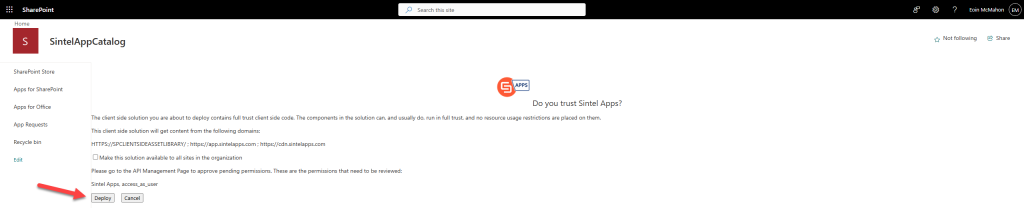
Note: If you select the option “Make this solution available to all sites in the organization” above it will mean that the process of configuring Sintel Apps within any site in your tenant will require 1 less manual step. You will no longer have to add the Sintel Apps app into a site before creating the Sintel Apps app Page which makes it easier to use Sintel Apps in the sites within your organization. - Once the update has been completed, you should be redirected to the AppCatalog and the latest “App version” number should be displayed which should match the latest version number as listed in AppSource.