
Search for answers or browse articles about Sintel Apps
Migrating Workflow History using a custom Microsoft Flow
In October 2021, an update to Sintel Forms introduced a new approach to storing workflow history data. As part of this change, the separate WorkflowHistory list was deprecated. Workflow history information is now stored directly in the main form list as JSON data in the SintelFormsWorkflowData and SintelFormsWorkflowDataExt fields.
Some client environments are still running versions of Sintel Forms released prior to the 2021 update. In these environments, workflow history continues to be stored in the WorkflowHistory list.
To support the upgrade of these environments, we developed a Power Automate (Microsoft Flow) migration process that transfers workflow history records from the WorkflowHistory list to the corresponding items in the main form list, where the data is stored in the new JSON-based fields.
Importing and configuring the migration flow
Follow the steps below to import the migration flow into your environment, configure it, and run it for your list.
- Download the solution package.
- Open Power Automate, select the desired environment, and navigate to Solutions.
- In the top command bar, click Import solution and browse to the downloaded solution file.
- Click Next and verify that the SharePoint – SintelFormsMigration connection is configured correctly. You may be prompted to authenticate using your user credentials.
- Click Next and review the environment variables.
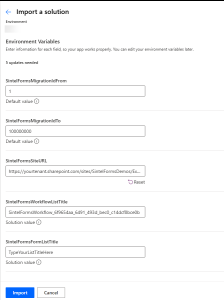
SintelFormsMigrationIdFrom – Minimum list item ID to be processed.
SintelFormsMigrationIdTo – Maximum list item ID to be processed.
SintelFormsSiteURL – SharePoint site URL where the form is located (for example: https://yourtenant.sharepoint.com/sites/yourform).
SintelFormsWorkflowListTitle – Title of the list that contains the workflow history. The name typically follows the format
SintelFormsWorkflow_[MainFormListGUID] (with underscores instead of hyphens).SintelFormsFormListTitle – Title of the list that contains the forms.
- Update the environment variables to match your setup and click Import. The solution will start importing and should appear shortly in your Solutions list.
- Open the Sintel Forms Migration solution.
- Update the Default Value for each environment variable to reflect your environment configuration.
- Open the Migrate Sintel Forms Workflow History flow and click Turn on.
Once the flow is enabled, you can run it to migrate your Sintel Forms workflow history.
Notes
- The flow processes a maximum of 5000 items per execution. If your list contains more items, use the variables SintelFormsMigrationIdFrom and SintelFormsMigrationIdTo to define ranges and run the flow multiple times.
- The flow only updates items where the SintelFormsWorkflowData field is empty.