



As many organisations already know, Microsoft has been gradually phasing out the SharePoint Add-In model, encouraging customers to move to solutions built on the SharePoint Framework (SPFx) for modern SharePoint environments.
For customers using Sintel Forms, this transition has already been underway for some time. Sintel Forms was originally built on the SharePoint Add-In model and has now been replaced by Sintel Apps, our new solution built on the SharePoint Framework.
Many customers have already completed the move to Sintel Apps, but if your organisation is still running Sintel Forms, now is a good time to ensure you have a plan in place.
Key Date to Keep in Mind
Sintel Forms must be upgraded to Sintel Apps before April 2nd, 2026.
If you haven’t already completed the upgrade, we recommend reviewing your existing forms and scheduling the upgrade in advance of this date.
What the Upgrade Involves
The upgrade involves 2 steps.
- Step 1 Preparing your forms
- Step 2 Upgrading your forms
Step 1 Preparing your forms
Before running the Sintel Apps Pre-upgrade check you must use the Sintel Forms Designer to prepare each of your forms.
- Make sure the form has the threshold prevention feature enabled
Sintel Forms Designer → Settings → Basic Features → List View threshold Prevention (if it’s already enabled you’re good to go) otherwise click on the link and click→ Start
- Ensure all form fields are present on the form layout
Sintel Forms Designer → Layout → Existing Fields → Auto-layout
You can then hide this section.
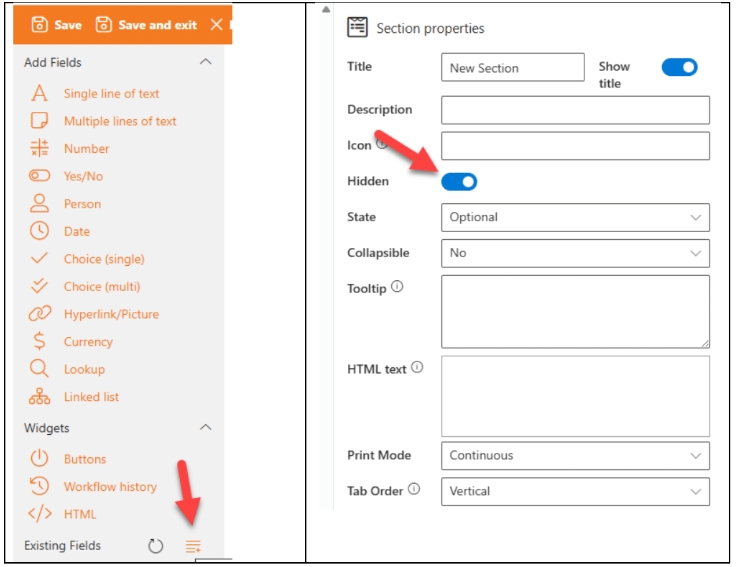
Save the changes
These steps are required to ensure that your form design is updated to the latest version and that all fields that may be referred to in your logic, are present on the form layout.
Step 2 Upgrading your forms
Once you have prepared your forms for the upgrade you can then begin the upgrade process using Sintel Apps and upgrading existing forms using the built-in upgrade wizard.
This process assumes that:
- Sintel Apps has been added to you tenant app catalog
- Sintel Apps has been added to your specific site
- The SintelApps page has been created in your specific site
To update a form in your site:
- Open the SintelApps page from the Site Pages library.
- Select the list containing the form that you wish to load in the Sintel Apps Designer.
- You will be prompted to run the Pre-upgrade check.
- Once the process is finished you should review the report and if there are no issues you can close the report and Save the new configuration.
- Your form will now be updated to use Sintel Apps.
Notes on the upgrade process
- The process has been designed to minimise disruption to end users
-
SharePoint lists remain unchanged
-
Existing form data is preserved
-
Forms are rebuilt in the new designer as a preview
-
Nothing changes for users until the upgraded form is saved
This allows administrators and form owners to review the new version before making it live.
For IT and SharePoint Administrators
If you have been contacted about upgrading from Sintel Forms to Sintel Apps or been asked to install Sintel Apps in your Microsoft 365 tenant you’ll find step-by-step guidance here:
A Good Time to Review All SharePoint Add-Ins
While upgrading Sintel Forms, it’s also worth reviewing any other SharePoint Add-Ins currently in use within your tenant.
Since Microsoft is moving away from the add-in model altogether, organisations should ensure they have a clear plan for migrating legacy add-ins to modern solutions built on the SharePoint Framework or other supported technologies.
Taking this opportunity to review your existing add-ins can help avoid future disruption as the platform continues to evolve.
Need Assistance?
If you have questions about upgrading your forms or would like assistance with the migration to Sintel Apps, our team is happy to help, just drop us an email at support@sintel.ie.





0 Comments