


Managing employee leave shouldn’t mean chasing emails, updating spreadsheets or manually calculating annual leave balances.
For many organisations using Microsoft 365, the tools needed to improve this process are already part of their digital workplace. The challenge is bringing them together into a simple, user-friendly application.
With Sintel Apps and Sintel BI, organisations can build a fully integrated employee leave management app in SharePoint, giving employees, managers and HR teams one central place to manage time off.
In this article, we’ll walk through an example Employee Leave App built using Sintel Apps and Sintel BI, explore its features and explain how the complete application template can be exported and imported into another environment.
Why Build an Employee Leave Management App in Microsoft 365?
Many businesses still manage annual leave and employee absences through a combination of spreadsheets, emails, shared calendars and manual approvals.
While these approaches may work for smaller teams, they quickly become difficult to maintain as organisations grow.
Common challenges include:
- Employees not knowing how much annual leave they have remaining.
- Managers receiving leave requests through multiple channels.
- HR teams manually updating leave records and balances.
- Limited visibility into upcoming team absences.
- Difficulty tracking approvals and maintaining a history of requests.
- Spreadsheets becoming outdated or inconsistent.
An employee leave management system built in Microsoft 365 helps bring these processes into one central location.
Rather than introducing another disconnected application, organisations can create a solution that works within their existing SharePoint environment.
That’s exactly what we’ve built using Sintel Apps and Sintel BI.
Introducing the Employee Leave App Built with Sintel Apps
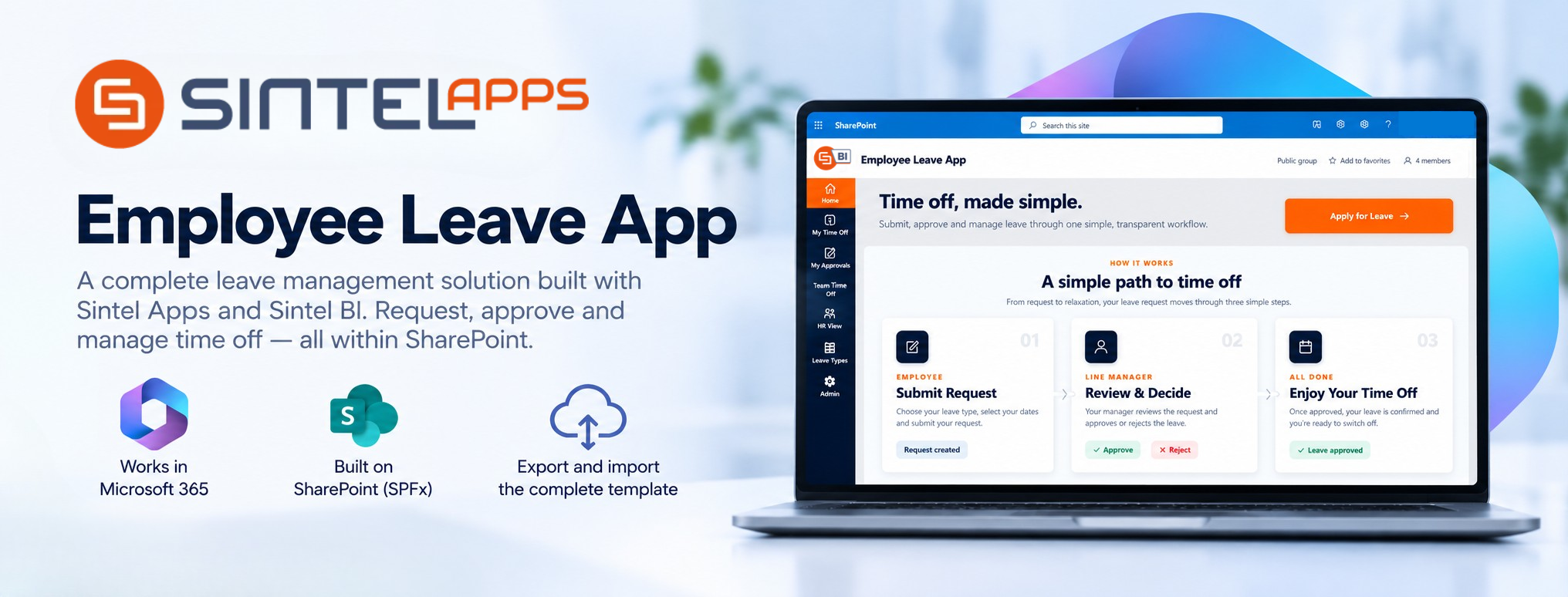
Our Employee Leave App is a SharePoint-based solution designed to make requesting, approving and managing employee leave straightforward.
Built using Sintel Apps for forms and workflows and Sintel BI for dashboards and reporting, the application provides a complete leave management experience.
The solution includes:
- Employee leave request forms.
- Manager approval workflows.
- Annual leave, sick leave and unpaid leave tracking.
- Leave allowance and remaining balance calculations.
- Employee leave history.
- Manager approval views.
- Team absence calendars.
- HR administration and reporting.
- Interactive dashboards and visualisations.
All of these features are brought together through a single SharePoint interface, making the application accessible within the organisation’s existing Microsoft 365 workspace.

A Simple, Guided Leave Request Process
The application follows a clear three-step workflow:
1. Employee submits a request
Employees select their leave type, choose their dates and submit the request.
2. Line manager reviews the request
The request is routed to the employee’s line manager for review and a decision.
3. Employee receives a decision
Once approved, the request is recorded with its updated status, giving employees and managers visibility into the outcome.
1. Build Custom Employee Leave Request Forms with Sintel Apps
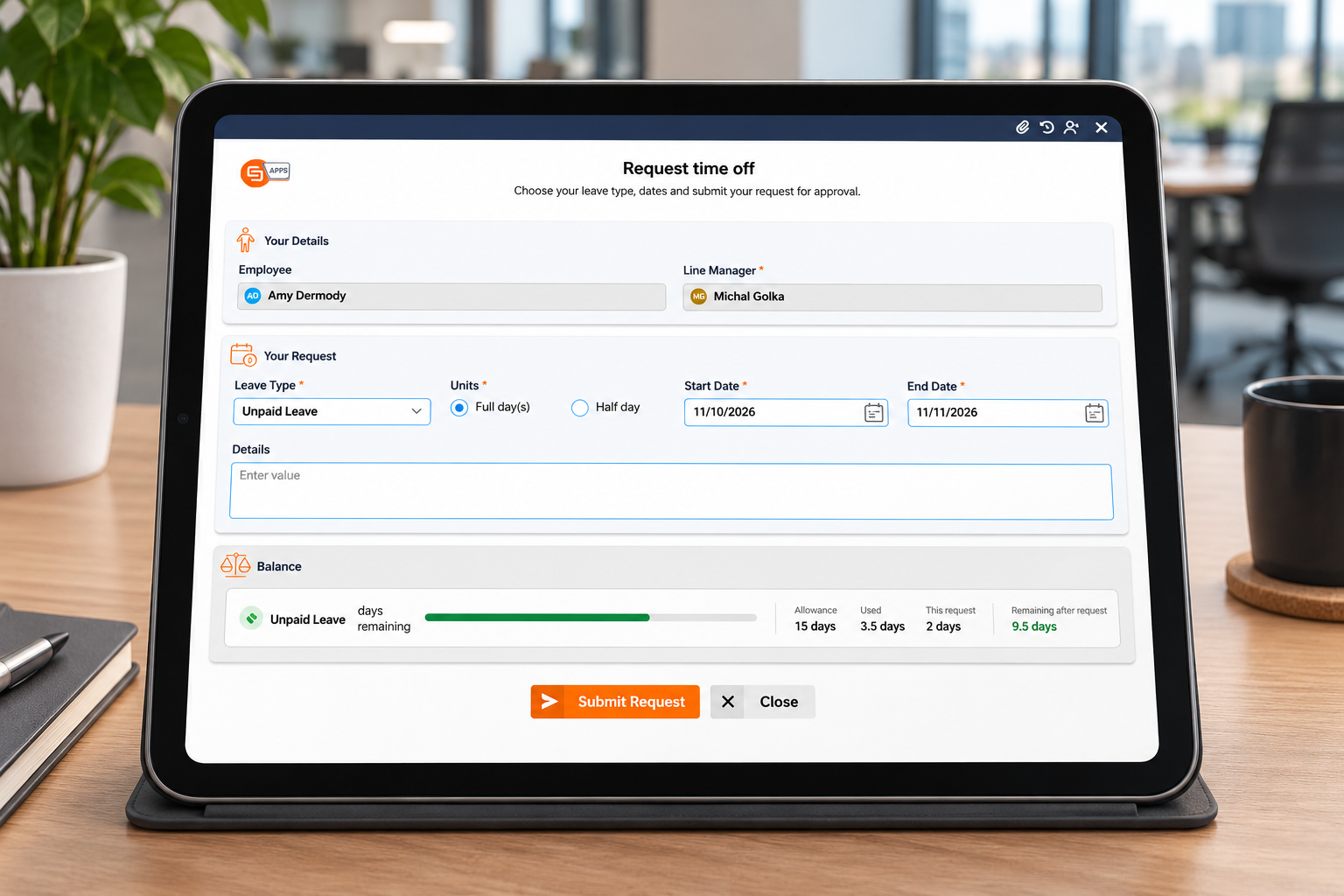
At the heart of the solution is a custom leave request form built using Sintel Apps.
Employees can submit their leave requests through a simple interface without needing to email their manager or complete a spreadsheet.
The example form includes:
- Employee: Identifies the person requesting leave.
- Line Manager: Identifies the manager responsible for approval.
- Leave Type: Allows selection of annual leave, sick leave or unpaid leave.
- Units: Supports full-day and half-day requests.
- Start Date and End Date: Captures the requested absence period.
- Details: Provides space for additional information.
- Leave Balance: Displays allowance, used days, requested days and remaining balance.
2. Automate Leave Approval Workflows
A leave management application needs more than a request form. It also needs a reliable way to manage approvals.
Using Sintel Apps, organisations can build a structured leave approval workflow that routes employee requests to the appropriate line manager.
The workflow follows a simple process:
Submit Request → Manager Review → Approve or Reject → Update Request Status
Managers can review requests and make decisions through a dedicated approval interface.
The application supports clear status indicators, including:
- Submitted
- Approved
- Rejected
This gives employees visibility into the progress of their requests while allowing managers to manage approvals consistently.
A dedicated My Approvals view brings relevant requests together, helping managers focus on the decisions that require their attention.
For HR teams, workflow history provides additional visibility into the approval process.
3. Give Employees a Personal Leave Dashboard
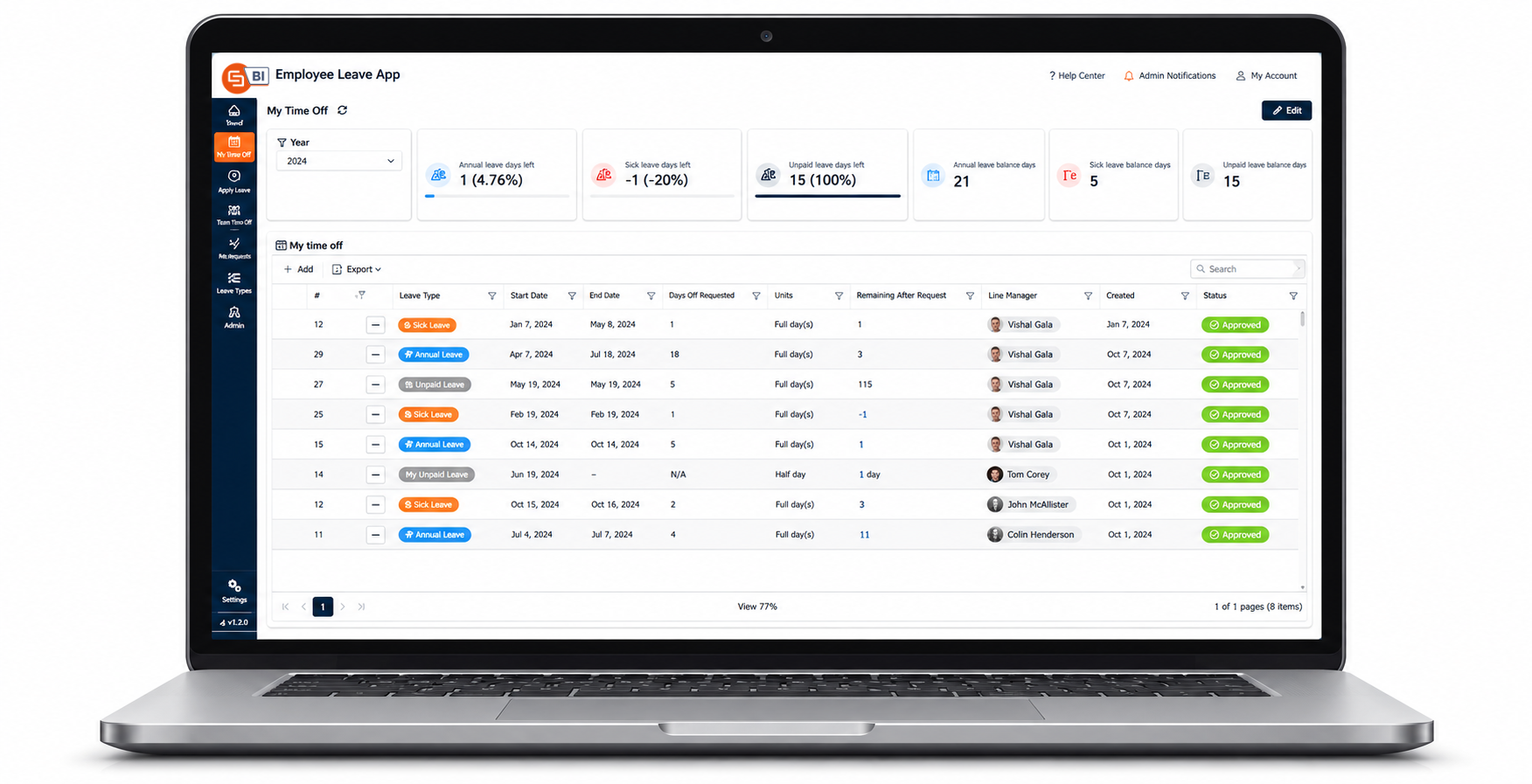
The My Time Off dashboard provides a central location for employees to manage their leave information.
Leave Allowance Overview
At the top of the dashboard, employees can see their leave allowances across different categories, such as:
- Annual Leave
- Sick Leave
- Unpaid Leave
Allowance vs Used Leave
Using Sintel BI, the application displays an interactive chart comparing leave allowances against leave already used.
This makes it easier to understand leave balances at a glance.
Leave Request History
Below the dashboard, employees can review their previous requests in a searchable, filterable table.
The table includes information such as leave type, start and end dates, number of days requested, remaining balance, line manager and approval status.
The interface also provides filtering and Excel export capabilities, making leave records easier to review and work with.
Together, these features create a self-service employee leave management experience within SharePoint.
4. Visualise Team Absences with Sintel BI
Knowing who is away and when is essential for team planning.
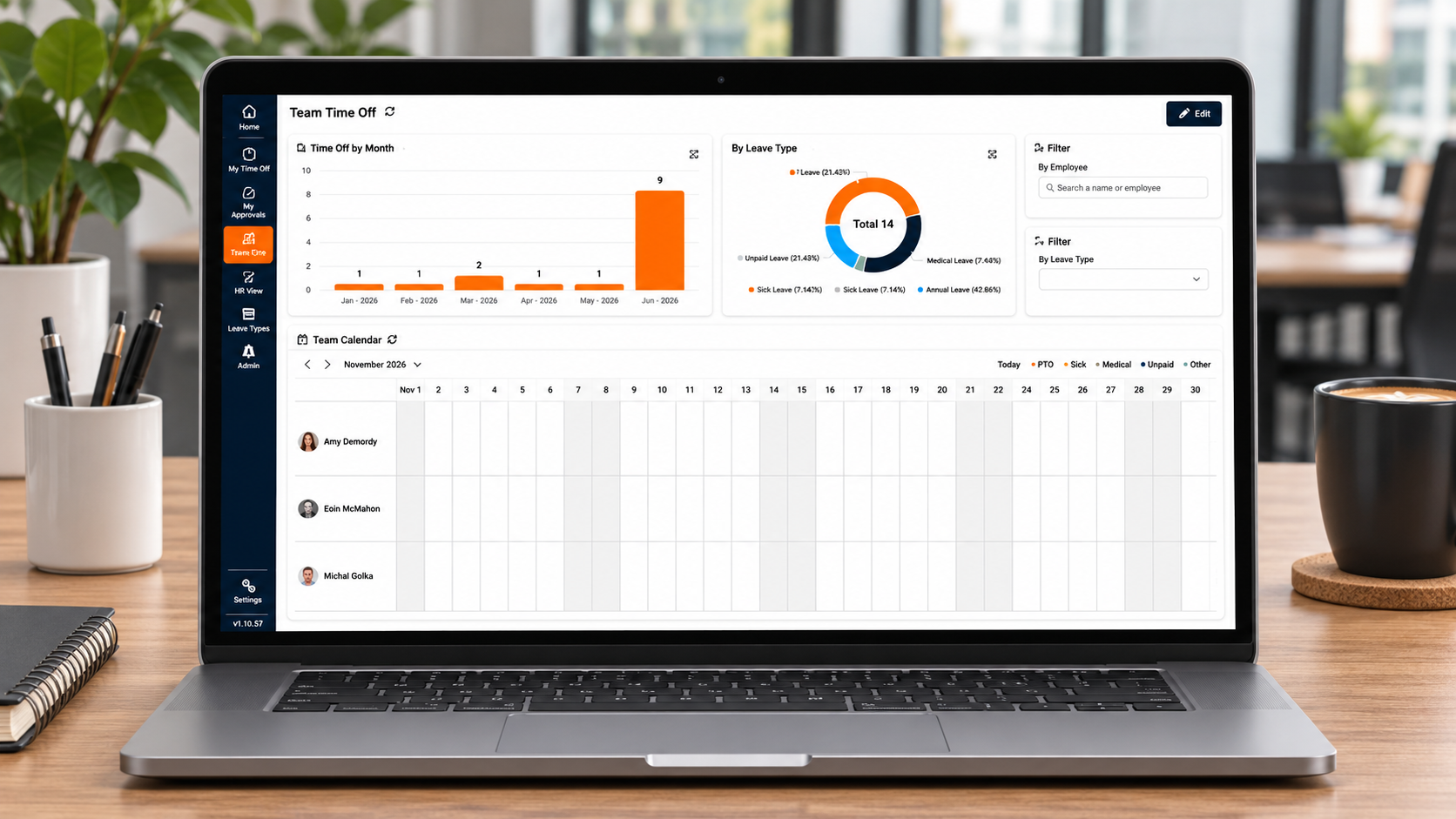
The Employee Leave App includes a Team Time Off dashboard that helps managers and HR teams understand leave activity across the organisation.
Built using Sintel BI, this dashboard combines interactive charts, filters and a team calendar.
Time Off by Month
A monthly chart provides an overview of leave activity throughout the year.
This makes it easier to identify periods with higher levels of employee absence and understand seasonal leave patterns.
Leave Breakdown by Type
A doughnut chart displays the distribution of leave across categories such as annual leave, sick leave and unpaid leave.
Managers and HR teams can quickly understand the types of absences recorded across their teams.
Interactive Team Leave Calendar
One of the most valuable features is the team calendar.
Instead of searching through individual leave records, users can view employee absences on a shared calendar.
The calendar supports different views, including:
- Day
- Week
- Workweek
- Month
- Agenda
Filters allow users to focus on specific employees or leave types.
This provides a practical way to understand upcoming absences, support workforce planning and improve team coordination.

5. Give HR Teams a Central Leave Management View
While employees need a simple way to request leave, HR teams need broader visibility across the organisation.
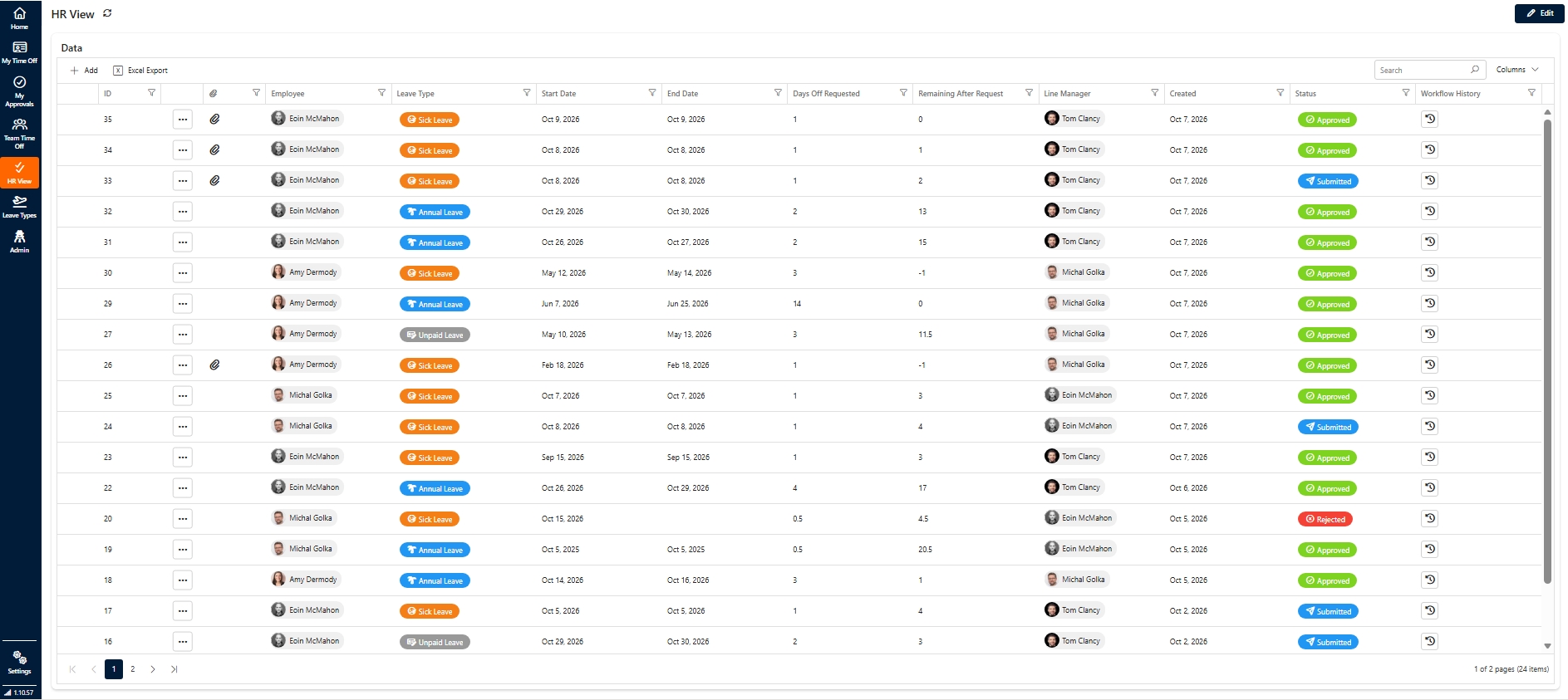
The Employee Leave App includes a dedicated HR View where authorised users can review leave records across employees.
The view brings together important information, including:
- Employee name
- Leave type
- Start and end dates
- Number of days requested
- Remaining leave balance
- Line manager
- Request creation date
- Approval status
- Workflow history
HR teams can search, filter and review records from one central interface.
The example also includes Excel export functionality, allowing records to be exported for further analysis or administrative purposes.
By centralising leave information, organisations can reduce the need to maintain multiple spreadsheets and make leave administration more manageable.
6. Export and Import the Complete Employee Leave App Template
One of the biggest advantages of building this solution with Sintel Apps and Sintel BI is the ability to reuse the application template.
The complete Employee Leave App template can be exported and imported into another environment.
This means organisations don’t need to start from scratch every time they want to deploy a similar leave management solution.
Instead, the existing application can provide a foundation for another deployment.
This is particularly useful for:
Microsoft 365 consultants
Create a reusable leave management solution that can be adapted for different customer environments.
IT departments
Use an existing application template as a starting point rather than rebuilding every form and workflow.
Organisations with multiple environments
Reuse the application structure across suitable SharePoint environments, with environment-specific configuration as required.
Businesses looking to accelerate development
Start with an established leave management application and customise it to reflect their own processes.
After importing the template, organisations can tailor elements such as leave types, allowances, manager assignments, approval processes and reporting requirements.
The result is a reusable foundation for building employee leave management applications in Microsoft 365.
FAQs
Who Is This Employee Leave App For?
This solution is particularly relevant to organisations that already use Microsoft 365 and want a more structured way to manage employee absences.
It can be useful for:
- HR teams looking to simplify leave administration and improve reporting.
- Line managers who need visibility into employee absences and approval requests.
- Employees who want a self-service way to request leave and check balances.
- Microsoft 365 administrators looking to deliver business applications within SharePoint.
- SharePoint consultants who want reusable application templates for customer projects.
- IT teams looking to replace manual processes with structured digital workflows.
Can You Build Your Own Employee Leave Management App in SharePoint?
Yes.
With Sintel Apps and Sintel BI, organisations can create a SharePoint-based employee leave management solution that combines forms, workflows, dashboards and reporting.
The example we’ve shown demonstrates how these components can work together to create a complete leave management experience.
Rather than developing every component from the beginning, teams can focus on adapting the application to their leave policies and business requirements.



0 Comments