



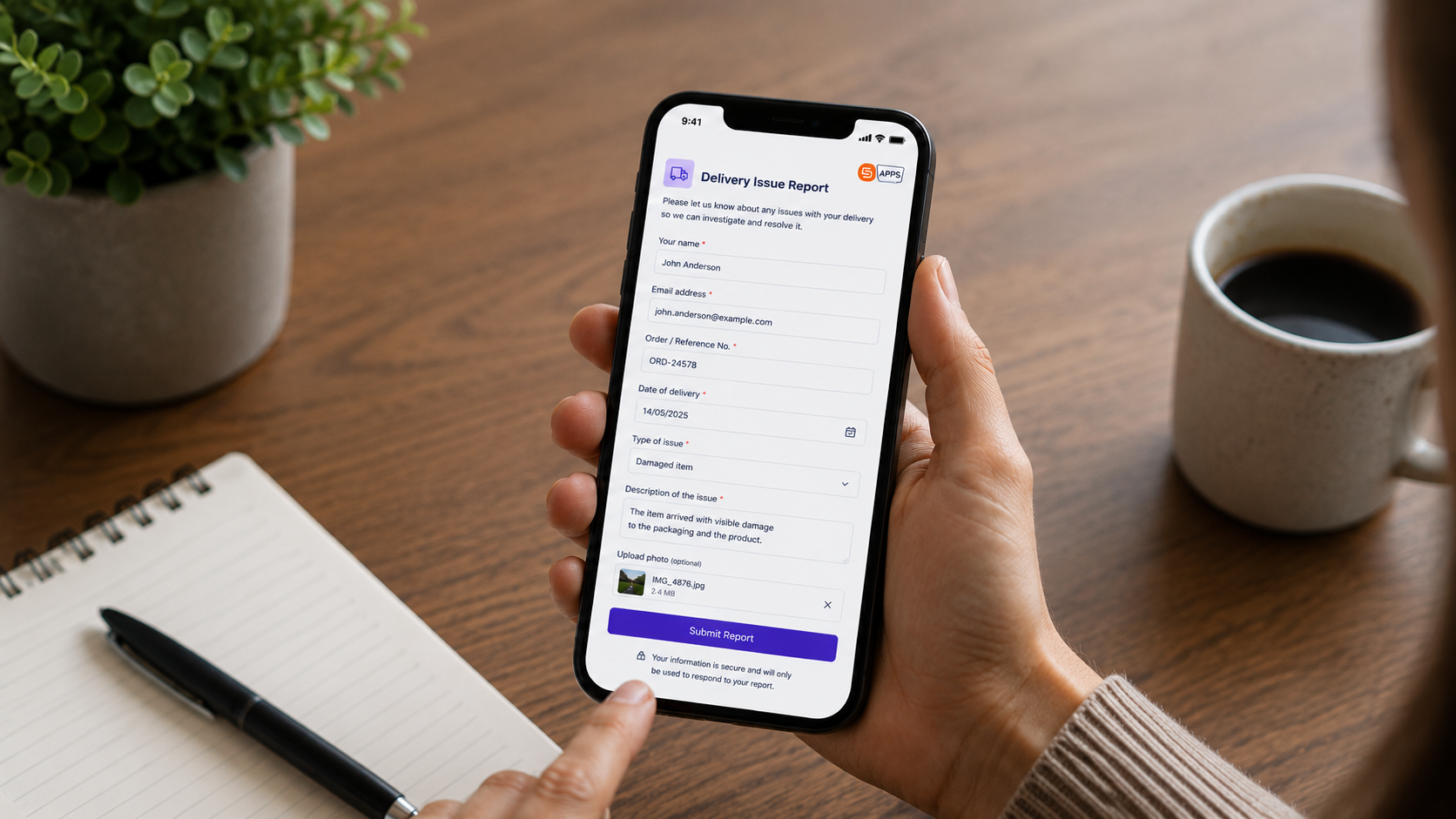
Organisations often need external users — customers, suppliers, contractors, partners, or members of the public — to interact with business forms and workflows.
The challenge is enabling that access securely without exposing SharePoint sites, Microsoft 365 environments, or internal tenant information.
Sintel Apps External Access & Sharing setting provides a secure and governed way to allow external users to submit, edit, and collaborate on forms without requiring direct SharePoint access, guest accounts, or visibility into your Microsoft 365 tenant.
Why External Form Access Matters
Many organisations rely on forms for:
- Customer onboarding
- Supplier submissions
- Incident reporting
- Service requests
- Recruitment applications
- Event registrations
- External approvals
- Multi-organisation collaboration
Traditionally, enabling external participation in SharePoint processes often meant:
- granting guest access
- exposing SharePoint sites
- managing Microsoft accounts
- increasing governance complexity
These approaches can create unnecessary administrative overhead while increasing exposure to internal systems and tenant information.
Sintel Apps removes that complexity by securely separating external form access from SharePoint permissions.
How External Access Works
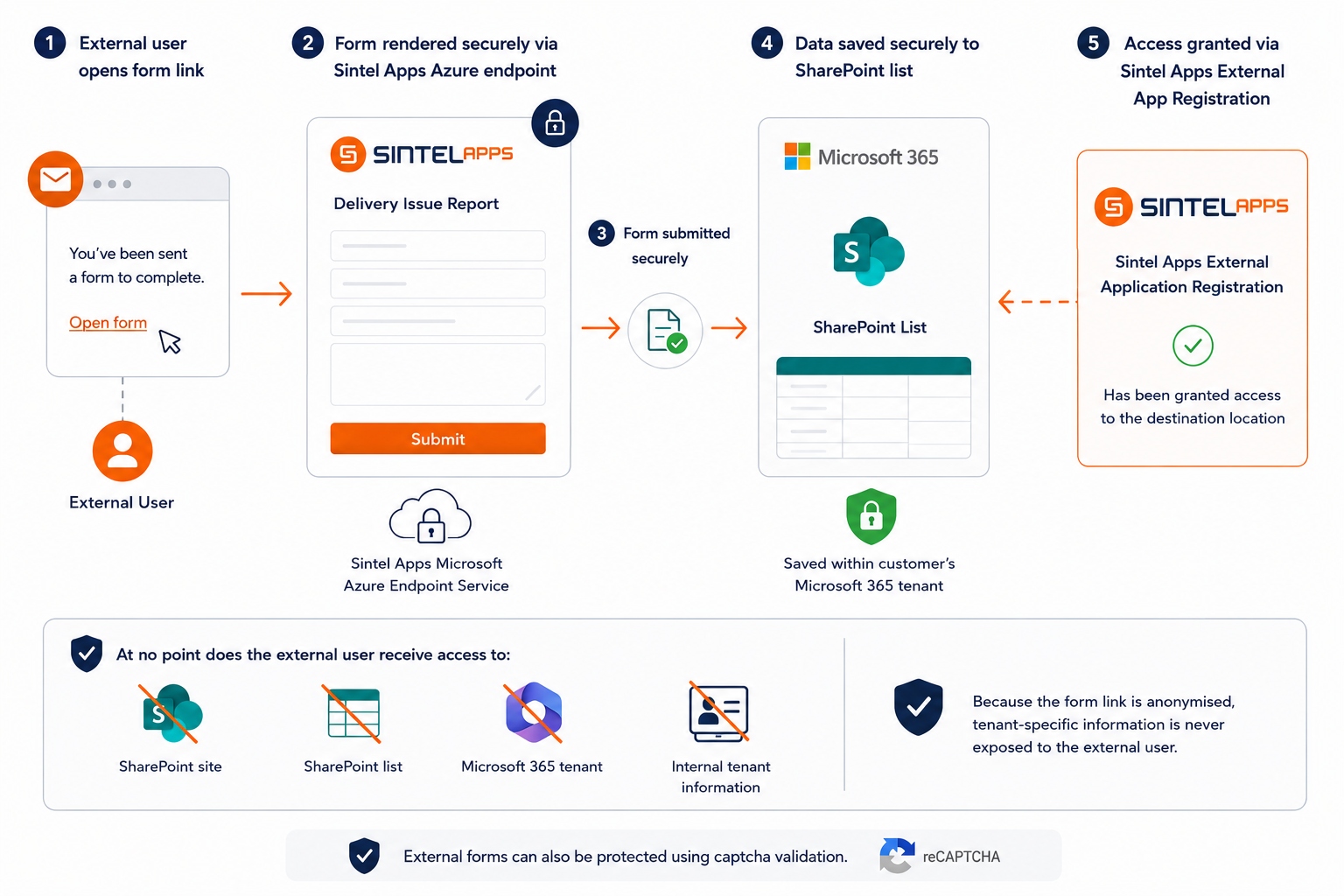
When an external user opens a secure anonymised form link, the form is rendered through the Sintel Apps Microsoft Azure endpoint service.
When the form is submitted:
- The Azure endpoint securely processes the request
- Submitted data is securely written to the appropriate SharePoint list
- The user never receives direct access to SharePoint
This is achieved using controlled application permissions that allow Sintel Apps to interact securely with the destination SharePoint location on behalf of the organisation.
Because access is handled securely through the application layer, external users cannot access:
At no point does the external user gain access to:
- SharePoint sites
- SharePoint lists
- Microsoft 365 tenant information
- internal tenant structure
The anonymised external form links also ensure tenant-specific information is never exposed publicly.
External Access Modes
Sintel Apps supports multiple external access modes depending on your business scenario.
Anonymous Submission
Anonymous Submission allows public users to securely submit forms without requiring:
- Microsoft accounts
- guest access
- SharePoint permissions
This is ideal for:
- public enquiry forms
- customer requests
- event registrations
- support requests
- external service submissions
External users can only interact with the specific form they are invited to access. They cannot browse or interact with your wider Microsoft 365 or SharePoint environment.
External Collaboration
External Collaboration enables external users to:
- return to forms
- update submissions
- participate in collaborative workflows
- respond to requests for additional information
Access is managed through secure email-based links, helping maintain both usability and governance.
This model is particularly useful for:
- customer onboarding
- supplier management
- contractor processes
- project collaboration
- approval workflows
External Sharing
External Sharing allows internal users to securely share individual forms externally without granting SharePoint permissions or exposing internal systems.
This enables controlled collaboration with external parties while maintaining strong governance and security boundaries.
Built-In Security & Control Features
Captcha Protection
Externally accessible forms can be protected using captcha validation to help prevent:
- spam submissions
- automated bots
- malicious activity
Captcha protection is enabled by default and is strongly recommended for all public-facing forms.
People Picker Protection
People picker controls are hidden by default for external users to prevent accidental exposure of user-related information.
Separate controls are available for:
- new forms
- existing forms
This helps organisations maintain privacy and security standards.
Widget Visibility Controls
Administrators can control which widgets are visible externally.
For example:
- Workflow History widgets can be hidden from external users to prevent exposure of internal workflow or audit information.
Confirmation Screens & Redirects
Sintel Apps supports configurable confirmation screens and redirect behaviour after external form submission.
Organisations can:
- redirect users to custom pages
- provide branded confirmation experiences
- display next-step instructions
- guide users through onboarding or support processes
This creates a more professional and user-friendly external experience.
Real-World Use Cases
Customer Onboarding
Allow customers to securely submit onboarding information without needing SharePoint access or Microsoft accounts.
Supplier & Contractor Management
Collect:
- compliance documents
- safety certifications
- onboarding details
- approvals
without exposing internal systems.
Incident & Maintenance Reporting
Enable external users to securely submit:
- maintenance requests
- fault reports
- incident forms
- service issues
through controlled public-facing forms.
Recruitment & Candidate Applications
Candidates can securely submit:
- applications
- CVs and supporting documents
- onboarding information
- recruitment responses
without becoming guest users within your Microsoft 365 tenant.
Multi-Organisation Collaboration
Support collaboration between:
- partners
- clients
- contractors
- suppliers
without opening access to your SharePoint environment.
Designed for Secure Governance
External access within Sintel Apps is always an explicit administrative decision.
Key governance principles include:
- external access is optional
- administrator consent is required
- SharePoint permissions are never elevated
- access can be enabled or removed at any time
- external users never gain direct SharePoint access
- tenant visibility remains protected
This allows organisations to maintain strong Microsoft 365 governance while still enabling secure and efficient external collaboration.
What are you waiting for?
If your organisation needs secure external forms and collaboration within Microsoft 365 and SharePoint, Sintel Apps provides a flexible solution designed for enterprise governance, security, and usability.
Request a demo to see how external users can securely interact with forms and workflows — without exposing your SharePoint environment or increasing governance complexity.




0 Comments