SharePoint Workflow Builder for Microsoft 365
Build and automate business workflows directly on SharePoint Online with Sintel Apps.
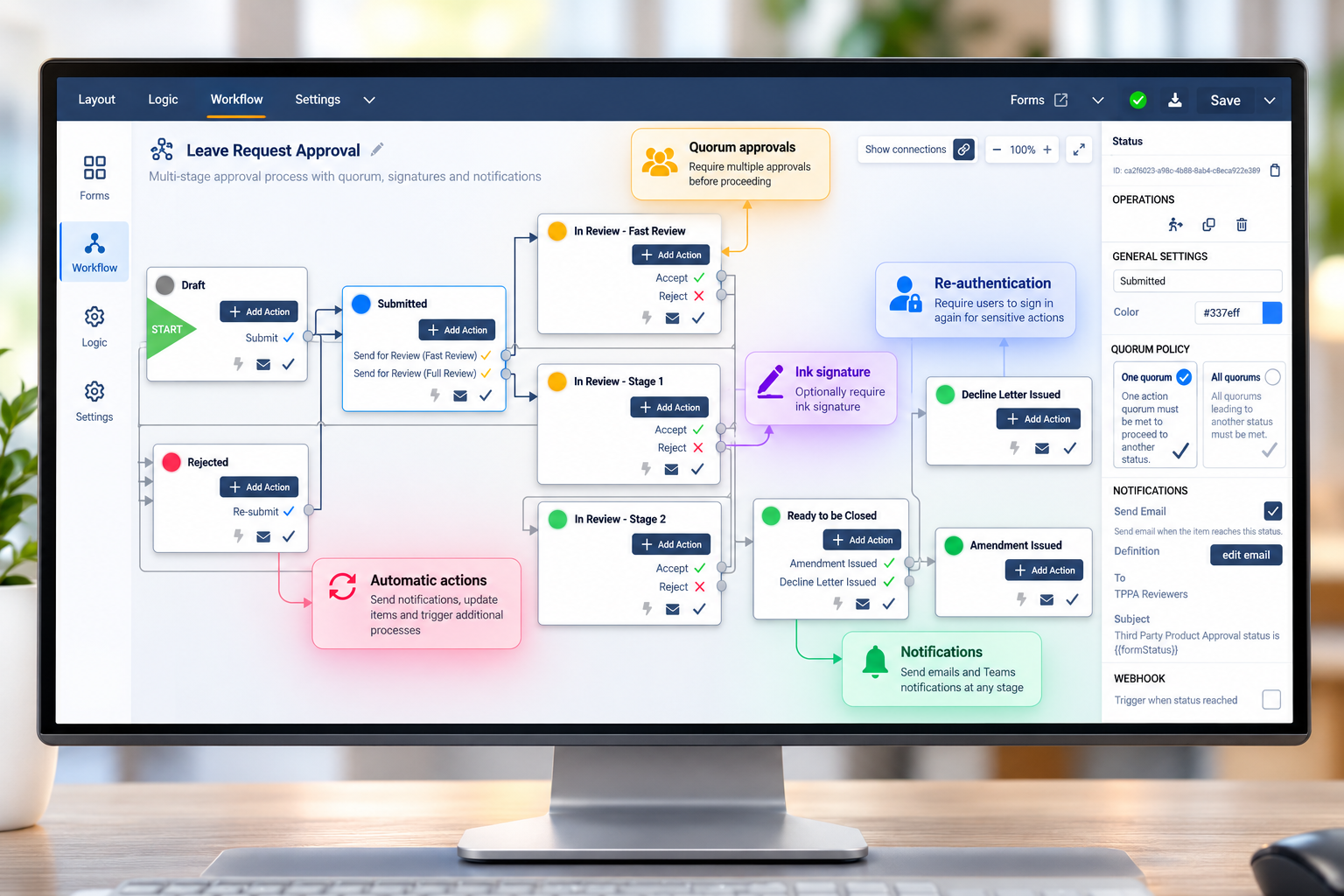
Create approval workflows, multi-stage business processes, notifications and automated actions using a visual workflow designer.
Build advanced approval processes with capabilities such as quorum-based approvals, optional ink signatures and user re-authentication, while keeping your workflow and business data within Microsoft 365.
What Is a SharePoint Workflow Builder?
A SharePoint workflow builder enables organisations to automate business processes around information stored in SharePoint Online.
Workflows can route items through multiple stages, assign tasks to users or groups, request approvals, send notifications and automatically perform actions as a process progresses.
Sintel Apps includes a visual workflow designer built specifically for SharePoint Online and Microsoft 365, allowing organisations to create simple approval workflows as well as complex multi-stage business processes without developing custom workflow applications.
Build Advanced Approval Workflows
Sintel Apps goes beyond simple approve or reject workflows. Build multi-stage approval processes with flexible rules that control how decisions are made and how a process moves between workflow stages.
Configure approval actions for individual users or groups, define quorum requirements and add additional verification when a business process requires stronger approval controls.
Quorum-Based Approvals
Define approval quorums to control how many or which approval actions must be completed before a workflow can progress to the next stage.
Ink Signatures
Optionally require users to provide an ink signature when completing an approval or other workflow action.
Re-authentication & MFA
Require users to re-authenticate and, when required, complete multi-factor authentication (MFA) before completing selected workflow actions, providing additional identity verification for sensitive approvals and business processes.
Workflow Notifications
Send notifications when a workflow status changes or when a workflow action becomes available to a user.
Confirmations & Mandatory Comments
Add confirmation steps to workflow actions and require comments when needed — for example, when rejecting a request.
API & Power Automate Integration
Trigger workflow actions through the Sintel Apps API, allowing Microsoft Power Automate and other systems to interact with workflow processes.
Track Every Step with Workflow History
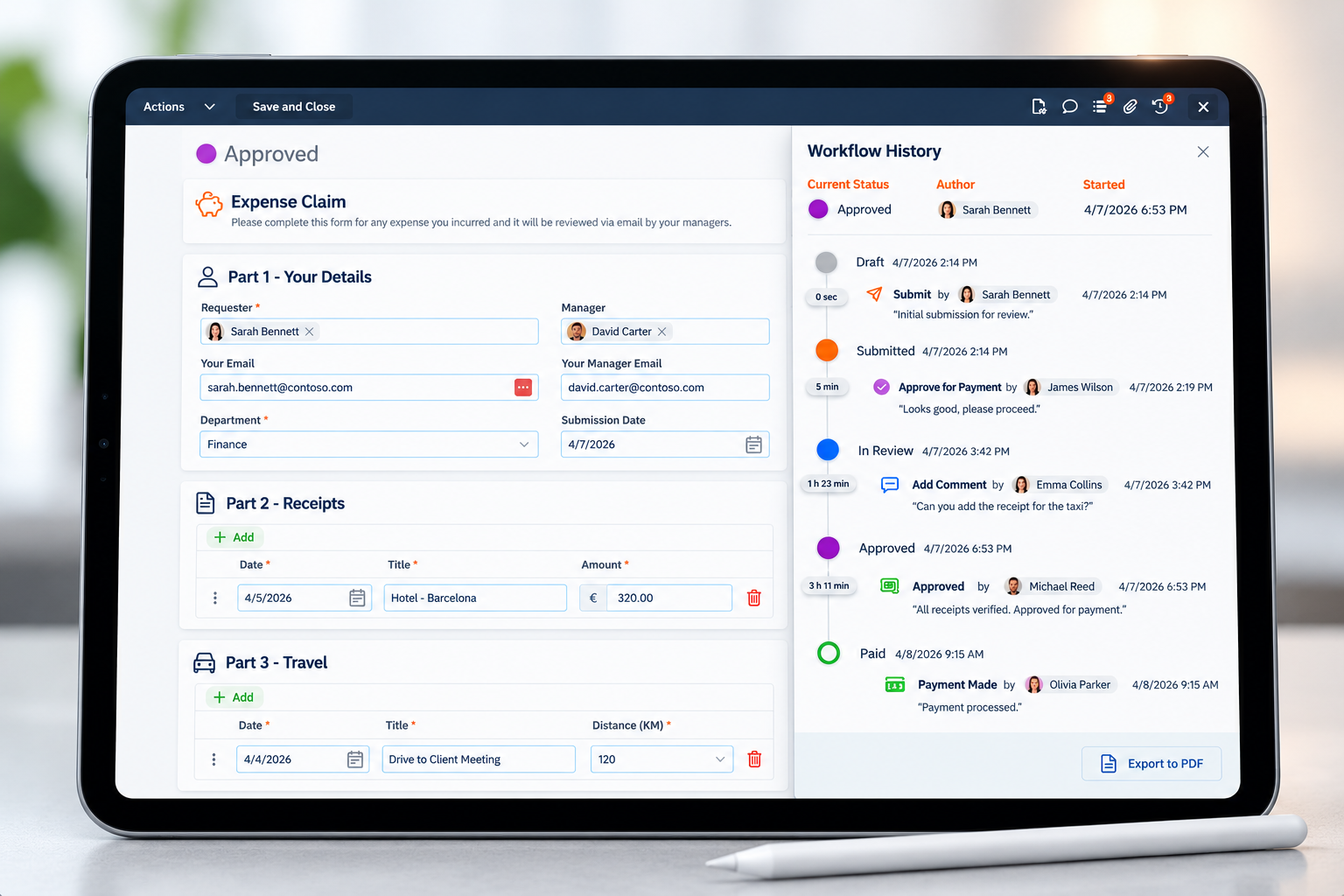
Sintel Apps provides a complete workflow history that makes it easy to see how a business process progressed from start to finish.
View status changes, workflow actions, users responsible for each action and the time spent between stages in a clear visual timeline.
Workflow history can also be displayed directly within an application using the Workflow History widget and exported to PDF when a permanent record of the process is required.
SharePoint Workflow Examples
Sintel Apps can be used to automate a wide range of business processes on SharePoint Online, from simple approvals to complex multi-stage workflows involving multiple teams and decision points.
Purchase & Expense Approvals
Route purchase requests and expense claims through approval stages based on your business process.
Document Approvals
Manage document review, approval, rejection and amendment processes with a complete workflow history.
HR & Employee Processes
Automate leave requests, employee onboarding and other internal HR processes.
Inspections & Audits
Route inspections, findings and corrective actions through review and approval stages.
Business Requests
Manage access requests, equipment requests and other internal business processes.
Multi-Stage Approvals
Build complex approval processes involving multiple reviewers, approval stages and quorum-based decisions.
Extend SharePoint Workflows with Microsoft Power Automate
Sintel Apps includes its own visual workflow engine for managing business processes, approvals and actions directly within SharePoint applications.
When a process needs to interact with other Microsoft 365 services or external systems, Sintel Apps workflows can also be integrated with Microsoft Power Automate.
Using the Sintel Apps API, Power Automate can trigger workflow actions, allowing SharePoint applications to participate in broader automation processes across Microsoft 365 and connected systems.
This gives organisations the flexibility to use Sintel Apps for application workflows while extending automation beyond SharePoint when required.
Workflows can be combined with modern SharePoint forms and business logic to create complete business applications. Learn more about how to build no-code apps on SharePoint Online with Sintel Apps.
SharePoint Workflow Builder FAQ
1. What is a SharePoint workflow builder?
A SharePoint workflow builder allows organisations to automate business processes around data stored in SharePoint Online. Workflows can manage approvals, route requests between users, send notifications and perform actions as a process moves between stages.
2. Can I build approval workflows on SharePoint Online?
Yes. Sintel Apps provides a visual workflow designer for building approval workflows directly around SharePoint Online applications, including simple approvals and complex multi-stage processes.
3. Can a SharePoint workflow require multiple approvals?
Yes. Sintel Apps supports quorum-based approvals, allowing you to define how many or which approval actions must be completed before a workflow can progress.
4. Can workflow approvals require a signature or MFA?
Yes. Selected workflow actions can optionally require an ink signature, user re-authentication and, when required, multi-factor authentication (MFA).
5. Can I require a comment when someone rejects a request?
Yes. Workflow actions can include confirmation and can require users to enter a comment, for example when rejecting a request or providing a reason for a decision.
6. Can SharePoint workflows send notifications automatically?
Yes. Sintel Apps can send notifications when a workflow status changes and when a workflow action becomes available to a user.
7. Can I see the complete history of a SharePoint workflow?
Yes. Sintel Apps provides a visual workflow history showing status changes, actions, users and timing. Workflow history can also be displayed using the Workflow History widget and exported to PDF.
8. Can Sintel Apps workflows integrate with Microsoft Power Automate?
Yes. The Sintel Apps API can be used by Microsoft Power Automate to trigger workflow actions, allowing Sintel Apps workflows to participate in broader Microsoft 365 and external automation processes.
Build SharePoint Workflows with Sintel Apps
Automate business processes on SharePoint Online with visual workflows, advanced approvals, quorum rules, notifications, signatures, MFA and complete workflow history.
Build everything from simple approval workflows to complex multi-stage business processes within your Microsoft 365 environment.
Start building with Sintel Apps today or contact us to discuss your SharePoint application requirements.