Modern SharePoint Forms for Microsoft 365
Build modern, responsive forms directly on SharePoint Online with Sintel Apps.
Add conditional logic, validation, dynamic fields, business rules and advanced layouts while keeping your data in SharePoint and Microsoft 365.
Sintel Apps helps organisations replace basic SharePoint forms and legacy form solutions with flexible business forms that can become part of complete SharePoint applications.
What Are SharePoint Forms?
SharePoint forms provide the user interface for creating, viewing and editing information stored in SharePoint lists.
Standard SharePoint forms are suitable for many simple scenarios, but business processes often require more advanced layouts, conditional fields, validation, business rules and integration with workflows.
Sintel Apps extends SharePoint Online with a modern forms designer that enables organisations to build flexible business forms directly within Microsoft 365.
Design Powerful Forms for SharePoint Online
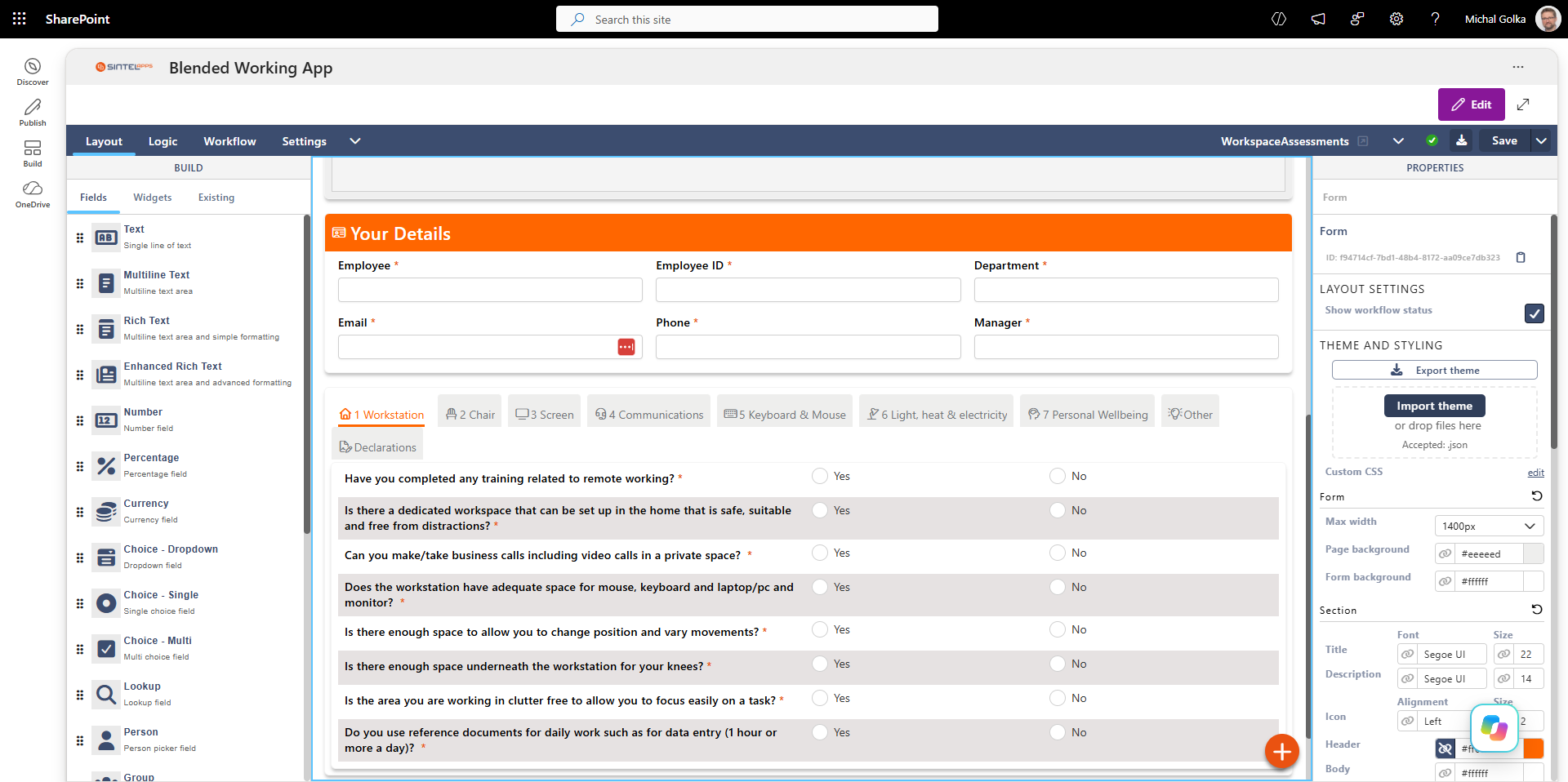
Sintel Apps provides a visual forms designer for creating modern SharePoint forms without developing a custom user interface from scratch.
Build forms using SharePoint fields together with advanced layout components, dynamic behaviour and business logic.
Flexible Form Layouts
Organise fields into sections, columns and tabs to create clear, user-friendly business forms.
Conditional Fields
Show, hide, enable or disable fields and sections dynamically based on form data and business rules.
Validation & Business Rules
Validate user input and apply business rules before information is saved to SharePoint.
Multiple Field Instances
Place the same SharePoint field multiple times within a form, allowing it to appear in different sections, tabs or layouts while remaining connected to the same underlying data.
Related Lists
Display and manage data from related SharePoint lists directly within a form, enabling users to work with parent and related records in a single application experience.
Ink Signature Fields
Capture handwritten signatures directly within SharePoint forms using an ink signature field, with the signature stored as part of the business process.
Advanced SharePoint Fields
Work with SharePoint field types including people, lookups, choices, dates, attachments and other business data.
Custom Styling
Control the appearance of forms, sections and fields to create applications that match your business requirements.
Custom JavaScript
Extend advanced forms with custom JavaScript when additional logic or specialised behaviour is required.
From Form Design to Complete Business Process
Sintel Apps brings form design, business logic and workflow together in a single SharePoint application experience.
Design the user interface, control how the form behaves, define approval stages and deliver a complete application directly within SharePoint Online.
Sintel Apps can also be used to build complete business solutions that combine forms, workflows, business logic and reporting. Learn more about our SharePoint App Builder.
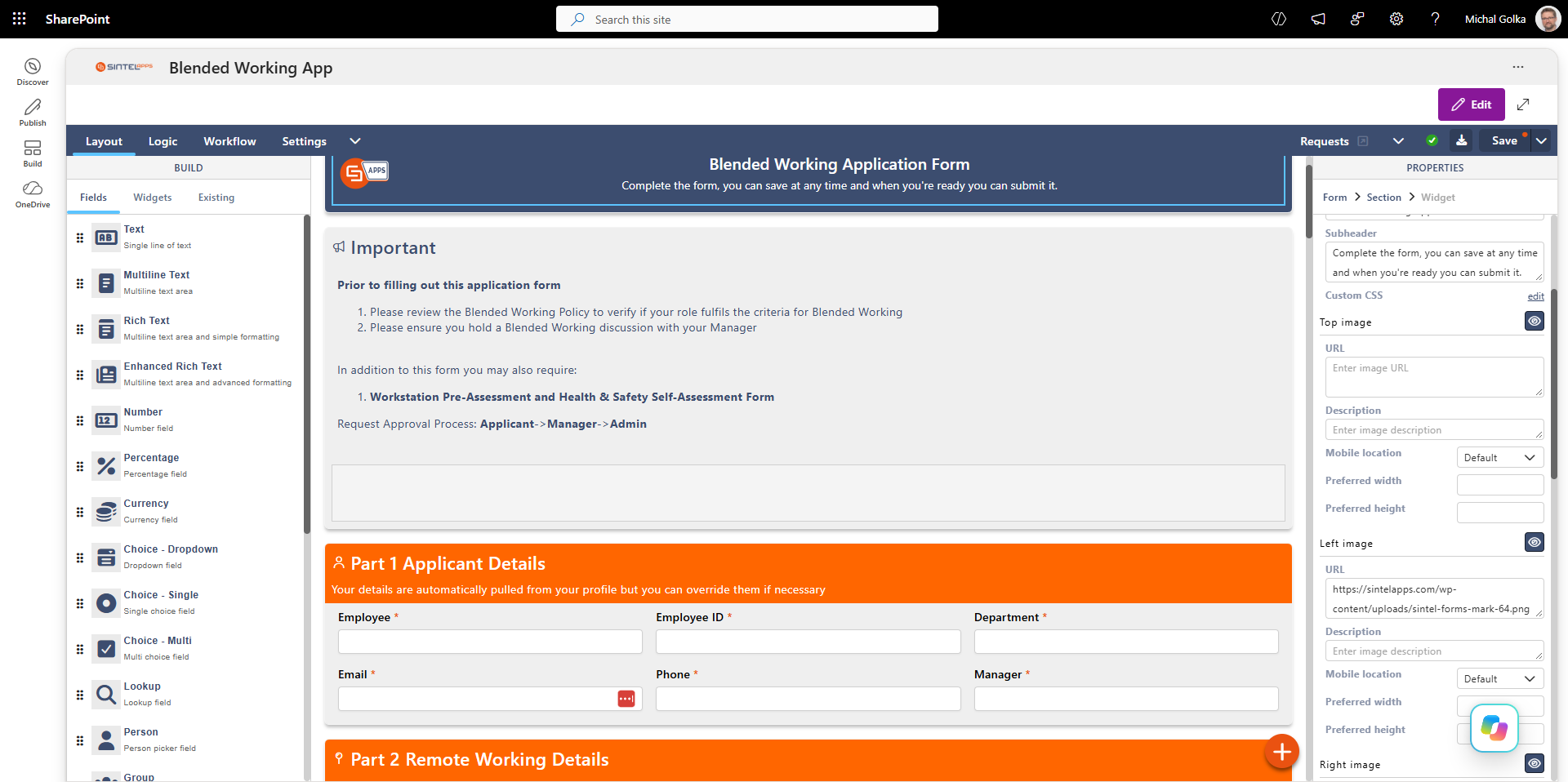
Design the Form
Build the user interface visually using SharePoint fields, sections, tabs and layout components. Configure the appearance and structure of the form without developing the complete interface from scratch.
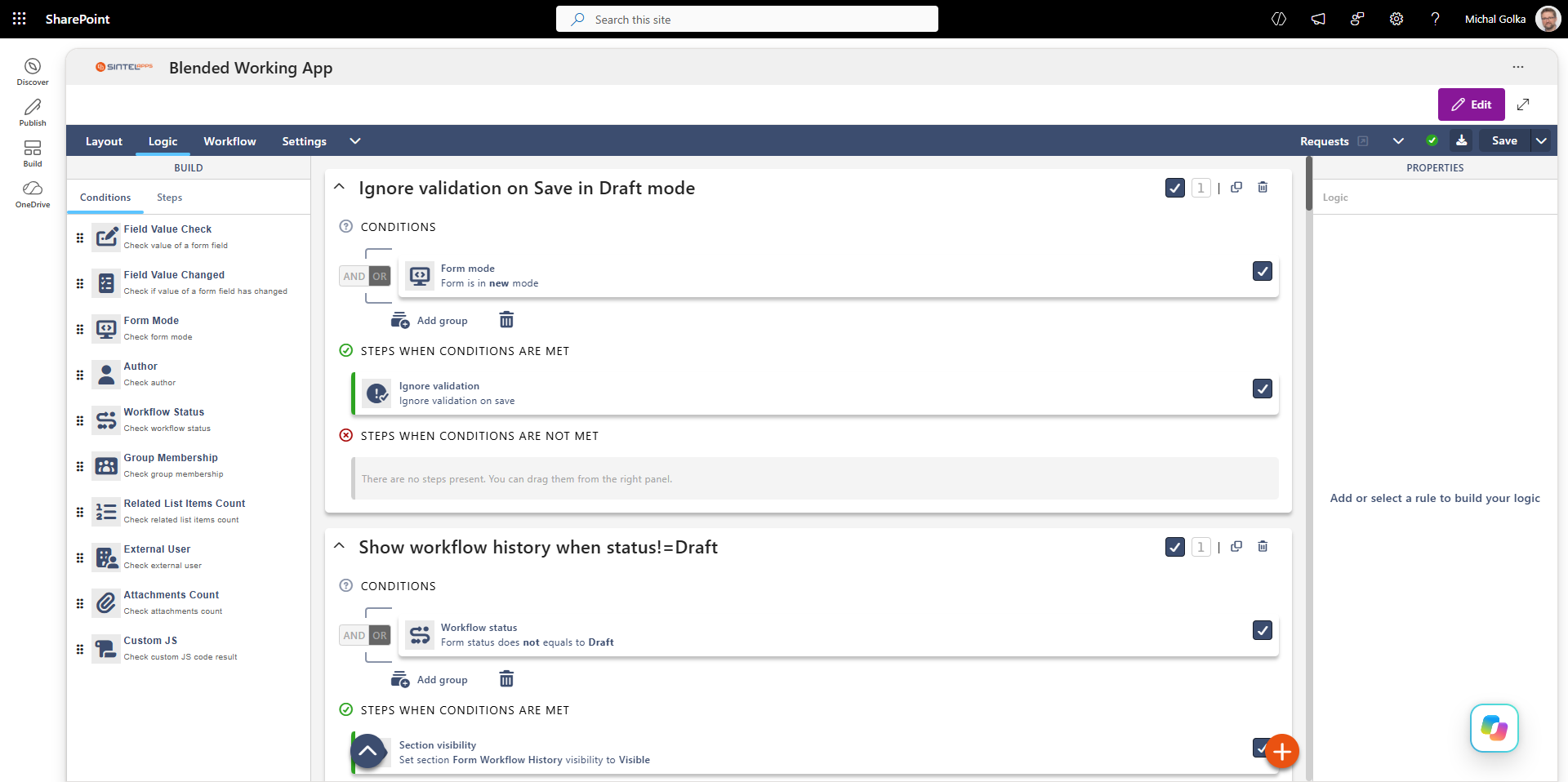
Add Business Logic
Control how forms behave using configurable conditions and actions. Show or hide sections, validate information, react to field values and apply business rules dynamically as users work with the form.
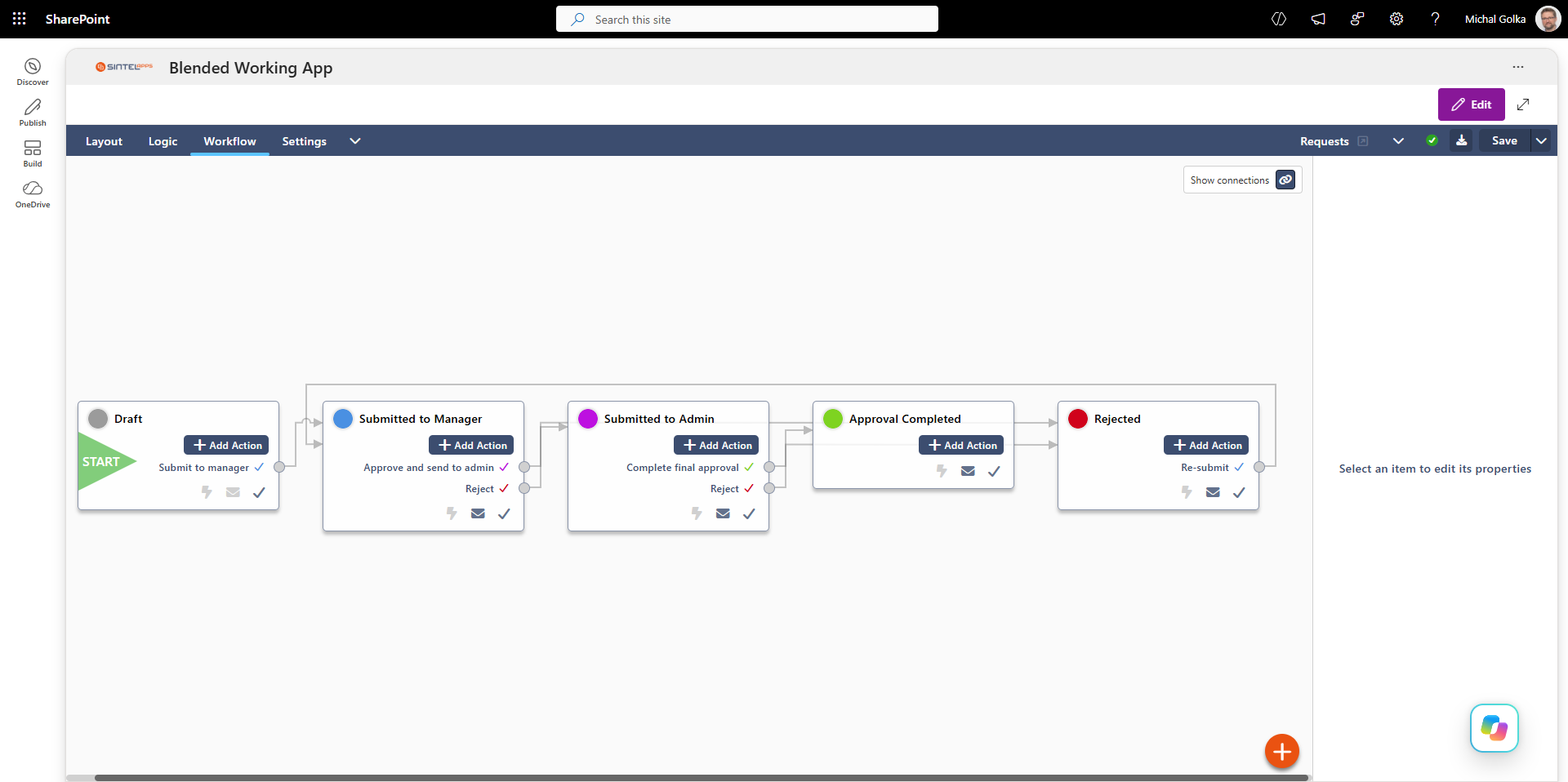
Build Approval Workflows
Define workflow stages, actions and approval paths that control how information moves through a business process. Combine form data, business rules and workflow states to build complete SharePoint applications.
Learn more about building advanced approvals and multi-stage processes with our SharePoint Workflow Builder.
Build Forms Directly on SharePoint Data
Sintel Apps works directly with SharePoint Online, allowing forms to create, view and update information stored in SharePoint lists.
There is no need to move your SharePoint data to a separate proprietary database simply to provide users with a modern forms experience.
Your forms remain part of your Microsoft 365 environment while using SharePoint permissions, lists, libraries and other platform capabilities.
SharePoint Forms, Microsoft Forms and Power Apps
Microsoft 365 provides several ways to collect and manage business information. The right approach depends on the complexity of the form, where the data is stored and how the form fits into the wider business process.
Microsoft Forms is designed primarily for surveys, questionnaires and simple data collection.
Power Apps provides a broader low-code platform for building applications across Microsoft 365 and other data sources.
Sintel Apps is designed specifically for organisations that want to build advanced forms and business applications directly on SharePoint Online, using SharePoint lists and libraries as the underlying data platform.
| Capability | Microsoft Forms | Power Apps | Sintel Apps |
|---|---|---|---|
| Primary use | Surveys & data collection | General low-code applications | SharePoint forms & business applications |
| SharePoint-focused | No | Not exclusively | Yes |
| SharePoint lists as data | Not directly | Supported | Native focus |
| Advanced business logic | Limited | Yes | Yes |
| Workflow / approvals | Via Power Automate | Via Power Automate | Built-in workflow + Power Automate |
Frequently Asked Questions About SharePoint Forms
What are SharePoint forms?
SharePoint forms provide a user interface for creating, viewing and editing information stored in SharePoint lists. Sintel Apps extends standard SharePoint forms with advanced layouts, conditional fields, validation, business rules, related lists and workflow capabilities.
Can I customise SharePoint forms with Sintel Apps?
Yes. Sintel Apps provides a visual forms designer for SharePoint Online that allows you to create advanced layouts using sections, columns and tabs. You can also add conditional behaviour, validation, business rules, custom styling and JavaScript without developing the entire form from scratch.
Does Sintel Apps use SharePoint lists to store form data?
Yes. Sintel Apps works directly with SharePoint Online and can use SharePoint lists as the underlying data layer for forms and business applications. This allows organisations to keep their business data within their Microsoft 365 environment.
Can the same SharePoint field appear more than once on a form?
Yes. Sintel Apps allows the same SharePoint field to be placed multiple times on a form. This makes it possible to display the same field in different sections, tabs or layouts while keeping it connected to the same underlying SharePoint data.
Can SharePoint forms display data from related lists?
Yes. Sintel Apps supports related SharePoint lists, allowing users to view and manage related records directly within a form. This makes it possible to build parent-child scenarios and more complex business applications using SharePoint data.
Can I capture signatures in SharePoint forms?
Yes. Sintel Apps provides an ink signature field that allows users to capture handwritten signatures directly within a SharePoint form. This can be used in approval, inspection, confirmation and other business processes that require a signature.
Can SharePoint forms use conditional logic and business rules?
Yes. Sintel Apps allows forms to respond dynamically to user input and form data. Conditions and actions can be used to show or hide fields and sections, control field behaviour, validate information and apply business rules as users complete the form.
Can SharePoint forms include workflows and approvals?
Yes. Sintel Apps can combine SharePoint forms with built-in workflow capabilities and Microsoft Power Automate. Forms can participate in multi-stage approval processes, trigger actions and notifications, and change behaviour based on the current workflow stage.
Build Better Forms on SharePoint Online
Turn SharePoint lists into modern business forms with advanced layouts, conditional logic, validation, related data, signatures and workflow capabilities.
Sintel Apps gives organisations a SharePoint-focused approach to building forms and complete business applications within Microsoft 365.
Forms can also become part of a complete no-code business application. Learn more about how to build no-code apps on SharePoint Online with Sintel Apps.