



Most organisations have a vague sense of what training has been completed and where gaps lie. But in reality, skills data often lives in spreadsheets scattered across teams, training certificates saved in email folders, or knowledge locked inside managers’ heads.
This creates problems when:
-
You need to identify who’s qualified for a specific project.
-
You want to see where training budgets are best spent.
-
You must prove compliance (for example, health & safety or data protection).

The Solution: A Skills & Training Workflow
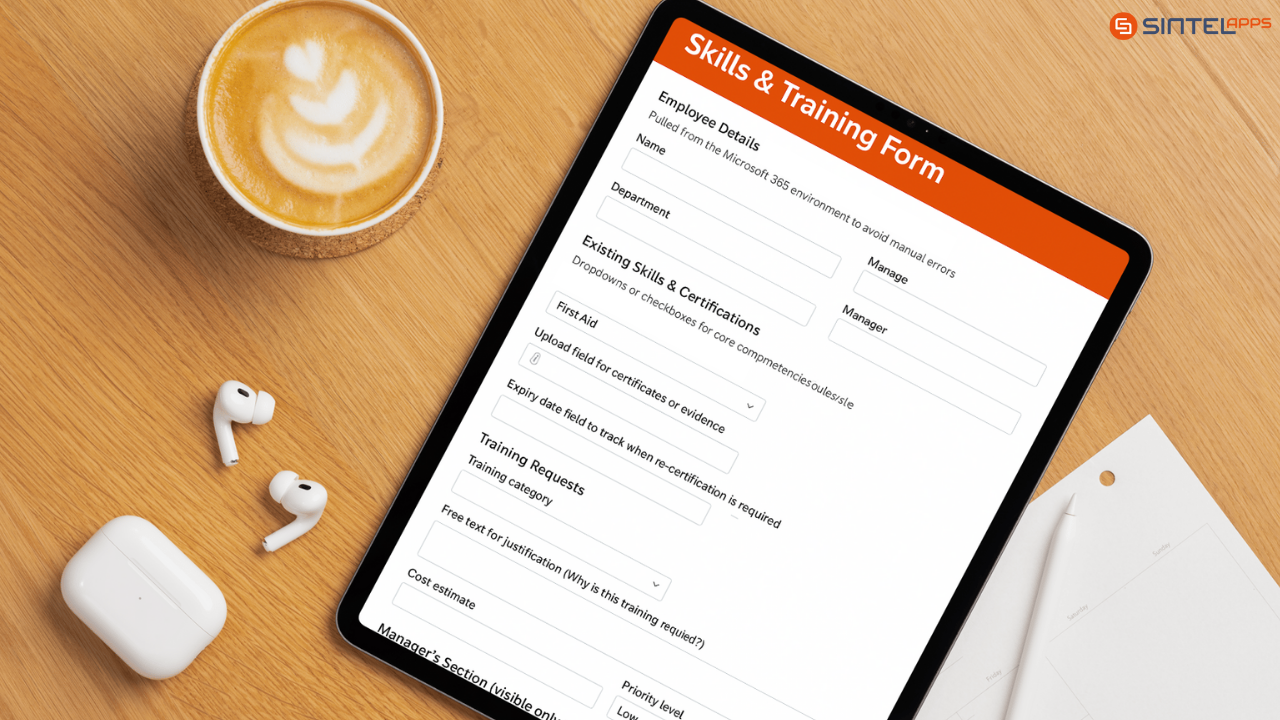
With Sintel Forms, you can build a Skills & Training form that centralises all of this information. Here’s what it could look like:
Form Structure & Fields
-
Employee Details (auto-populated)
-
Name, Department, Role, Manager.
-
Pulled from the Microsoft 365 environment to avoid manual errors.
-
-
Existing Skills & Certifications
-
Dropdowns or checkboxes for core competencies (e.g. “First Aid”, “Data Protection”, “Forklift Operation”).
-
Upload field for certificates or evidence.
-
Expiry date field to track when re-certification is required.
-
-
Training Requests
-
Dropdown for training category (Technical, Compliance, Soft Skills, etc.).
-
Free text for justification (“Why is this training required?”).
-
Cost estimate field.
-
Preferred dates/availability.
-
-
Manager’s Section (visible only to managers via conditional logic)
-
Approve/Reject request.
-
Budget code or cost centre.
-
Priority level (Low, Medium, High).
-
Rules & Logic
Sintel Forms allows you to embed smart behaviours into the form:
-
Conditional Visibility: Employees only see their own section; managers see all.
-
Auto-validation: If a certification’s expiry date is within 90 days, the system automatically flags it as “due for renewal”.
-
Routing Rules:
-
Training requests under £500 go straight to line managers.
-
Anything over £500 routes to HR or finance for further approval.
-
-
Mandatory Attachments: If “Certification” is selected, an upload field becomes mandatory to ensure evidence is provided.
Notifications & Alerts
To keep everything flowing smoothly, you can build in automated notifications:
-
For Employees: Confirmation email when a training request is submitted.
-
For Managers: Instant notification when a new request needs review.
-
For HR/Compliance: E-mails notifying of Training or Compliance Certs which will expire within 90 days.
-
For Everyone: Automated reminders when approved training is booked.

Turning Data into Insights with Sintel BI
Once you’ve captured all this structured data, Sintel BI turns it into dashboards tailored to different audiences:
-
Managers: Charts showing skills coverage in their team, highlighting risks if key certifications lapse.
-
HR: A view of upcoming training courses, budget spend vs requests, and cross-department skills gaps.
-
Compliance: A dashboard tracking which employees hold required certifications, who are overdue, and where to focus audits.
Drill-downs, filters, and visuals make it easy to move from a company-wide view to individual employee detail in seconds.
In Summary
Skills management might not be the first process you think of when it comes to workflow automation, but it’s one that touches every corner of a business. By reimagining how you track and visualise skills data, you unlock:
-
Better resource allocation.
-
Stronger compliance and risk management.
-
More motivated employees with clear development pathways.


0 Comments