
How can we help?
Search for answers or browse articles about Sintel Apps
Sintel Apps required permissions
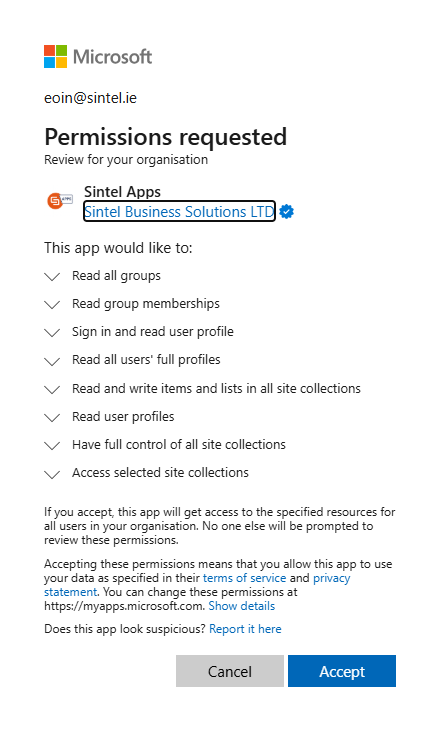
Sintel Apps requires administrator consent to work properly, and this can be configured in two ways:
- Standard Approach
This involves granting Sintel Apps permissions on all sites and is performed during the installation process of Sintel Apps. - Granular Approach
This involves granting Sintel Apps permissions on specific sites.
Standard Approach (preferred)
During the installation process of Sintel Apps the tenant admin will be prompted to grant the app the permissions it needs. They simply grant the permissions and then Sintel Apps can be used in any site in their tenant.
Granular Approach
Some organisations may prefer to only grant Sintel Apps the permissions it requires in specific sites. This provides more granular control over the permissions, however, it does require more configuration and most organisations prefer to use the standard approach.
How to use the granular approach (these steps must be performed by a tenant admin):
- Initially follow the Standard Approach to install Sintel Apps and grant the app the permissions it needs (including all sites full control).
- The app by default gets
Sites.FullControl.Allscope, but alsoSites.Selectedwhich allows the alternative approach.
- The app by default gets
- Next you Revoke
Sites.FullControll.Allpermission scope, e.g. in Azure.- From this moment the app will not be able to access site collections in an unattended way without explicit rights granted. Delegated permissions are not affected.
- You must not revoke any other permissions as doing so will prevent Sintel Apps from working correctly.
- Finally, you assign the permissions to a specific site.
- The easiest way is via the Microsoft Graph API (e.g., using Microsoft Graph Explorer https://developer.microsoft.com/en-us/graph/graph-explorer).
- Get Your Site ID
- Open:
https://[tenant].sharepoint.com/sites/[your_site]/_api/site/id - Copy the returned site ID.
- Open:
- Tenant Admin: Grant Permission
- Send a POST request to:
https://graph.microsoft.com/v1.0/sites/[site_id]/permissions - Use the following payload (replace
[site_id]and app details as needed):{ "roles": [ "fullcontrol" ], "grantedToIdentities": [ { "application": { "id": "dffccbe7-fe5e-4e9a-abfb-fc70b62d2dae", "displayName": "Sintel Apps" } } ] }Important:
- You need to repeat this action for every individual site where you intend to use Sintel Apps.
- For organisations that want more granular control it is a useful option.
- Given that this can be a time-consuming task we recommend using the Standard Approach.
- Send a POST request to: